![Engagedly dark.png]](https://help.engagedly.com/hs-fs/hubfs/Engagedly%20dark.png?height=31&name=Engagedly%20dark.png)
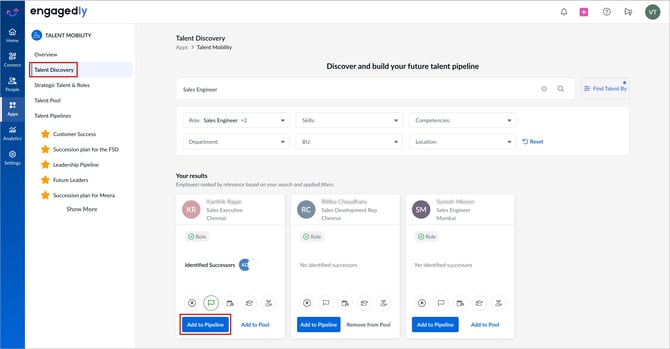
After search results appear, admins review the list of employees ranked by relevance based on the search and applied criteria and select employees to add to a talent pipeline.
To learn more about how to discover talents, refer to Discover talent in your organization.
Navigate to Apps > Talent Mobility > Talent Discovery.
- On the employee card, click Add to Pipeline to assign an employee to a pipeline.
2.Open the drop-down, select the existing pipeline, and click Add to Pipeline.
Alternatively, click Go to Pipeline and click Create Pipeline to create a new pipeline.