![Engagedly dark.png]](https://help.engagedly.com/hs-fs/hubfs/Engagedly%20dark.png?height=31&name=Engagedly%20dark.png)
Admins can configure readiness statuses in a talent pipeline after creating it to define how prepared candidates are for future roles.
Navigate to Apps > Talent Mobility > Talent Pipelines.
- Open a pipeline.
- Switch the toggle to Readiness at the top right.
- Click the Settings icon at the top right.
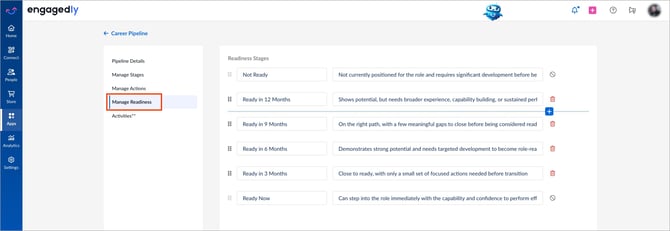
- In the left pane, go to Manage Readiness.
- Do one of the following as required:
- Hover between statuses and click the Plus
 icon to add another status.
 - Click the status name or description to edit directly in the text field.
- To reorder statuses, drag a status using the Six Dot
 icon on the left.
 - To remove a status, click the Delete
 icon on the right.
Notes:
-
You can edit or delete statuses.
-
You cannot delete or reorder the first and last statuses.
-
You can modify readiness statuses at any time after creating the pipeline.
- Adding, removing, or reordering readiness statuses is recorded in the pipeline activity log. For more information, refer to View the pipeline activity log.