![Engagedly dark.png]](https://help.engagedly.com/hs-fs/hubfs/Engagedly%20dark.png?height=31&name=Engagedly%20dark.png)
Talent mobility helps you discover, develop, and move talent within your organization. To get started, enable the app and access the “Overview” page, which opens as the default page for managing all talent mobility activities.
Enable talent mobility
Before using Talent Mobility, ensure your organization has an active subscription for the app.
After subscription, an admin must contact our support team to enable talent mobility for the organization.
📒Note: You can enable only the apps that your organization has subscribed to.
Navigate to Settings > Engagedly Apps.
- Scroll through the list of available apps and locate TALENT MOBILITY.
- Use the toggle to enable the app.
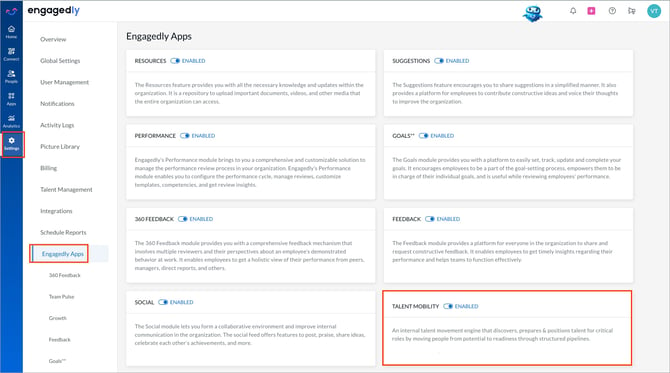
The system applies changes immediately.
Follow the same steps to disable or re-enable the app at any time based on your organization’s requirements and subscription.
To subscribe to additional apps, contact our support team.
Access the overview page
Once you enable talent mobility, you can access the “Overview” page to begin managing talent mobility activities.
Navigate to Apps > Talent Mobility.
The “Overview” page opens as the default page.
The overview page provides a centralized view of talent mobility activities in your organization. From this page, you can discover talent, identify critical roles and talent, manage pipelines, and monitor talent pool activity, all in one place.
Key sections of the overview page
Discover talent
Use the “Discover Talent” section to search for employees based on role, skills, competencies, location, or other criteria. Use the search bar and criteria to find relevant employees and take actions such as adding them to a talent pool, pipeline, or marking them as critical or successors.
Strategic talent and roles (STAR)
The “Strategic Talent & Roles” section highlights critical roles and critical talent in your organization. It helps you identify positions and individuals that are important for business continuity and succession planning.
Pipelines
The “Pipelines” section provides a summary of talent pipelines in your organization. Talent pipelines help prepare employees for future roles, and track their readiness.
Talent pool
The “Talent Pool” acts as a holding space for promising employees who are not yet assigned to a pipeline. Add employees to the talent pool when you identify their potential but are not ready to move them into a pipeline or succession plan. Review these employees and move them into pipelines when development plans are ready.
This section displays:
- Total members in the talent pool
- Members without pipelines
- Newly added members
For more information about available actions, refer to Actions in talent mobility overview.