![Engagedly dark.png]](https://help.engagedly.com/hs-fs/hubfs/Engagedly%20dark.png?height=31&name=Engagedly%20dark.png)
When HR/admins launch the performance review cycle and enable the employees' self-review, the employees receive pending actions on the homepage, in-app, and email notifications.
Note: You cannot access the review form after the review end date for self-reviews.
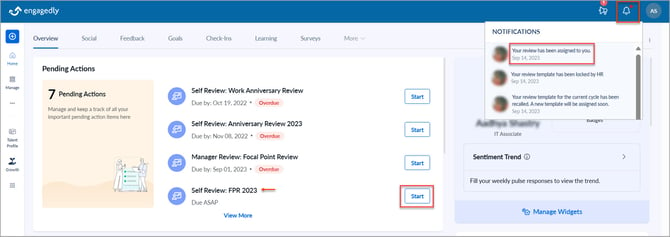
Access the review forms in multiple ways:
- On the homepage, in the pending actions, click Start.
- Click the Bell
 Icon to view the in-app notification of the review.
- Click View in your email.
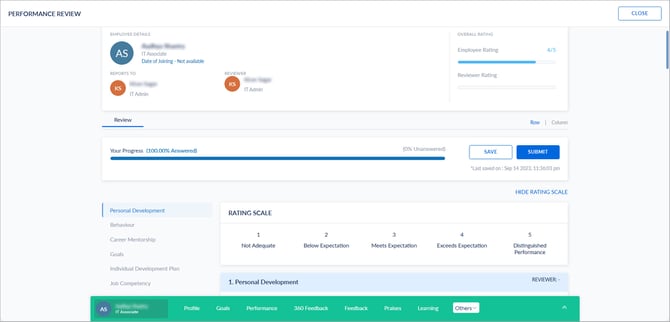
Once you open the review form, you can view the cycle name, review period, your details, manager, and reviewer’s name. On the left pane, you can view the different sections of the review form. Each section may include questions and sub-questions to which you have to provide ratings (if HR/admins enable the ratings) and comments.
If the HR/admins enable parallel review, your manager and you can parallelly start reviewing. If the HR/admins enable sequential review, after you submit your self-review, your manager can review your performance.
Based on HR/admins permission, you can view the following sections on your review form:
- Goals: You have to add goals and provide ratings and comments.
- IDP: You have to add IDPs and provide ratings and comments.
- Review Notes: You can add any notes with attachments if required.
- Development Plans: You can add IDPs or any plans for your development.
- Training Recommendations: You can add any available course to upskill yourself.
After completing the review, click SAVE to view your average rating.
You can save the review and modify it before submission. If you are confident to submit it, click SUBMIT.
Notes:
- Goals are automatically added to the review form based on the review period, eliminating manual search, repeated filtering, and the risk of missing or incorrect goals.
- Only your goals within the review period are shown.
- You can remove auto-added goals or add others if required.
- If no goals are available for the selected period, the review form displays an empty state.
-
You cannot modify ratings and comments after submitting your review. However, you can add the review notes, development plans, and training recommendations.
After your submission, your manager receives the notification to complete their review on your performance. After your manager’s submission, you can view their ratings and comments (if HR/admins enable the manager’s review visibility to the employees) and export your review form if requried.
You can request a resolution if you have any concerns about their ratings and comments. If you accept their ratings and comments, you can sign-off the review (if HR/admins enable the sign-off).