![Engagedly dark.png]](https://help.engagedly.com/hs-fs/hubfs/Engagedly%20dark.png?height=31&name=Engagedly%20dark.png)
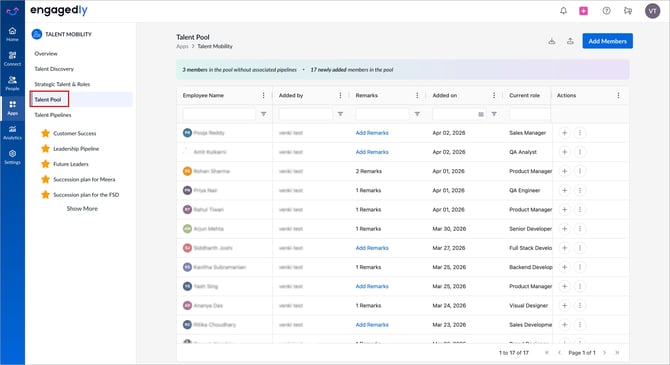
The talent pool gives admins a quick snapshot of member details. It shows who added each employee, their current role, remarks, and whether they are part of a pipeline or marked as critical. This view helps admins track succession planning, identify successors, and align employees with growth opportunities. The talent pool provides a grid with employee information and actions.
Navigate to Apps > Talent Mobility > Talent Pool.
The “Talent Pool” page opens and displays a list of all pool members.
Review the summary banner at the top of the page. The banner shows:
- The number of employees without associated pipelines.
- The number of newly added employees.
Review the members list in the table that displays the following details:
- Employee Name: Name and avatar of the pool member.
- Added by: Name of the admin who added the member to the pool.
- Remarks: Notes or comments about why the member is added.
- Added on: The date a member was added to the pool.
- Current role: The member’s present role in the organization.
- Aspired Role: The role the member aims for.
- Pipeline created for talent: Shows pipelines associated with the member.
- Part of Pipeline: Shows whether the member is included in a succession pipeline.
- Criticality Status: Indicates whether the employee is marked as critical or not critical.
- Identified Successors: Lists members identified as successors for the employee.
- Marked Successor For (Roles): Lists the roles for which the member is marked as a successor.
- Marked Successor For (Talents): Lists the talent positions for which the employee is marked as a successor.
From the “Talent Pool” page, you can perform additional actions:
- Add members to include new employees.
- Add or update remarks to include context for each employee.
- Perform additional actions to manage employees, such as schedule meetings, assign learnings, or remove them from the pool.
To learn more about these actions, refer to Manage members in a talent pool.