![Engagedly dark.png]](https://help.engagedly.com/hs-fs/hubfs/Engagedly%20dark.png?height=31&name=Engagedly%20dark.png)
Career path (CP) categories organize career growth opportunities into clear groups. They help employees navigate progression options while ensuring alignment with business goals. By categorizing career paths, you provide structure and customization for different roles, making it easier for employees to see how their careers can evolve.
Admins can add and manage career path categories.
📒Note: Creating a career path category is a prerequisite for creating a career path.
Use categories to:
- Group related career paths for clarity
- Align employee growth with organizational priorities
- Offer tailored progression routes for different roles or functions
Add a CP category
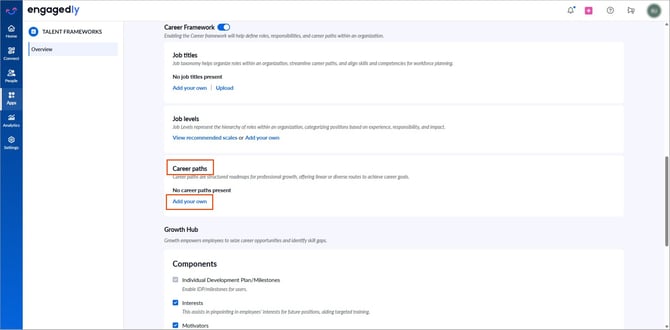
Navigate to Settings > Talent Frameworks.
If you have an active subscription to Engagedly's Growth app, you can also access Talent Frameworks from Apps > Growth > Settings.
- Go to Career Framework and ensure it is enabled.
- In the “Career paths” section, click Add your own (if no career paths are present).
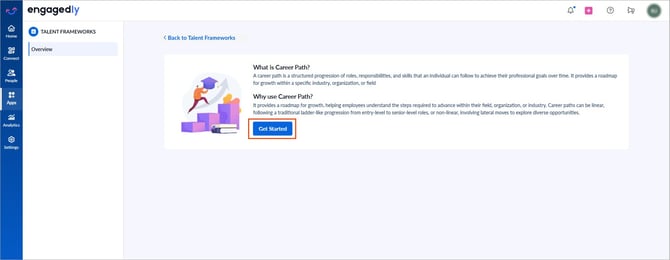
3. Click Get Started.
4. Enter a title and click Add.
Manage a CP category
All fields support inline editing.
- Click a CP category to edit the title.
- After making edits, click the Tick
 icon to save it.
 - Hover over the CP category and click the Delete
 icon to remove it.
After creation, only the “Manage” option appears in the “Career paths” section.
- Click Manage and click Add CP Category at the top right to include more categories.
After creating a CP category, add career paths to it. Refer to Add and manage career paths.