![Engagedly dark.png]](https://help.engagedly.com/hs-fs/hubfs/Engagedly%20dark.png?height=31&name=Engagedly%20dark.png)
Job functions group related roles within your organization. They serve as the top‑level category in the career framework, helping you organize job families and assign relevant job titles. Defining job functions creates a structured way to align roles with organizational goals and make career paths easier to navigate.
Admins can add and manage job functions.
📒Note: You must create a job function before you can add a job family.
Use job functions to:
- Provide clarity by grouping similar roles
- Align job families and titles under a broader category
- Support career path planning and organizational structure
Add a job function
Navigate to Settings > Talent Frameworks.
If you have an active subscription to Engagedly's Growth app, you can also access Talent Frameworks from Apps > Growth > Settings.
- Go to Career Framework and ensure it is enabled.
- In the “Job titles” section, click Manage.
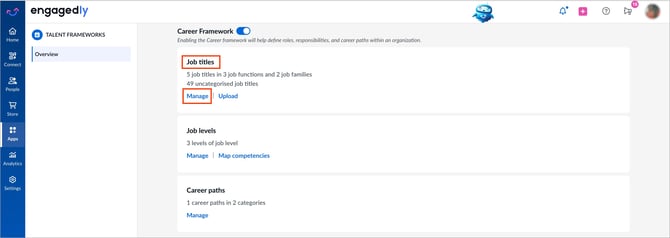
3. Open the Add drop-down at the top right and select Job Function.
4. Enter a title and description.
5. Click Add to save.
After you click “Manage”, the system opens the career path framework page with default prompts.
💡Tip: Select a prompt to use Engagedly’s AI assistant, Marissa, to help you categorize job functions.
Manage a job function
- Click a job function to edit the title and description.
- After making edits, click the Tick
 icon to save.
 - Hover over the job function and click the Delete
 icon to remove.