![Engagedly dark.png]](https://help.engagedly.com/hs-fs/hubfs/Engagedly%20dark.png?height=31&name=Engagedly%20dark.png)
Job titles are the foundation of the career framework. They represent specific roles within a job family and define the positions employees hold in the organization. Adding job titles establishes the basis for career paths, skills mapping, and role responsibilities.
Admins can add and manage job titles.
📒Note: You must create a job family before adding job titles. If you create a job title without assigning it to a job function and family, it appears under “Uncategorized”. Organize uncategorized titles into the appropriate function and family at any time.
Use job titles to:
- Define individual roles within a job family
- Provide clarity on responsibilities and expectations
- Build career paths and progression opportunities
Add a job title
Navigate to Settings > Talent Frameworks.
If you have an active subscription to Engagedly's Growth app, you can also access Talent Frameworks from Apps > Growth > Settings.
- Go to Career Framework and ensure it is enabled.
Option 1: Without creating a job function and family.
2. In the “Job titles” section, click Add your own (if no job titles are present).
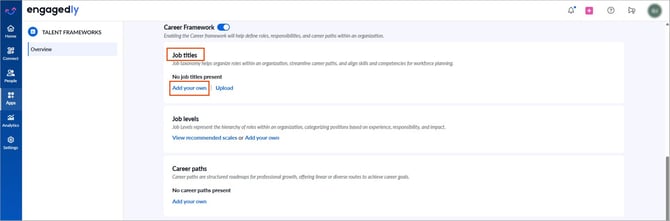
3. Open the Add drop-down at the top right and select Job Title.
4. Enter a title.
5. (Optional) Select a job function and family.
6. Click Add.
Option 2: After creating a job function and family.
- Click Manage in the “Job titles” section (if job titles exist).
- Click Add on the right side of a job family.
- Enter the job title and press Enter on your keyboard to save.
- Click Save to finalize.
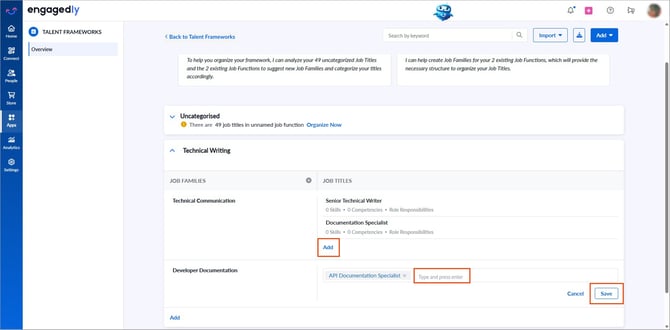
After creation, the “Manage” option appears in the “Job titles” section.
- Click Manage (if job titles exist).
- Click Add to include more titles.
After you click “Manage”, the system opens the career path framework page with default prompts.
💡Tip: Select a prompt to use Engagedly’s AI assistant, Marissa, to help you categorize job titles.
Manage a job title
- Click a job title to edit.
- After making edits, click the Tick
 icon to save.
 - Hover over a job title and click the Overflow
 Menu on the right.
-
- Select Move, select the job family, and click Move to relocate the job title.
- Select Delete and click Delete to remove the job title.