![Engagedly dark.png]](https://help.engagedly.com/hs-fs/hubfs/Engagedly%20dark.png?height=31&name=Engagedly%20dark.png)
Authors can add employees with the “Learning manager” permission as authors or co-authors to a course or learning path and manage them as required.
If an admin is not already an author or co-author, they can add themselves as an author or co-author.
Add authors
Navigate to Apps > Learning > Author.
- Go to the Authored by you tab and open a course.
- In the “Info” tab, click Edit on the right.
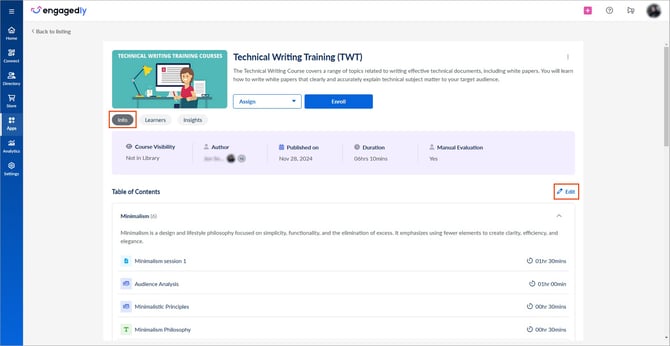
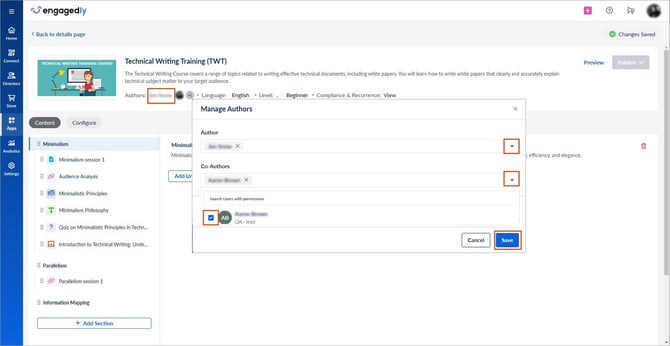
3. Click the author’s name below the learning description.
4. Open the “Author” or “Co-Authors” drop-down.
5. Search for and select admins or employees with the learning manager permission.
6. Click Save.
📒Note: If an admin is not an author or co-author, they can view only the “Info” and “Learners tabs” on the details page. Authors and co-authors can view the “Info”, “Learners”, and “Insights” tabs.
Manage authors
Authors can remove other authors and co-authors when required.
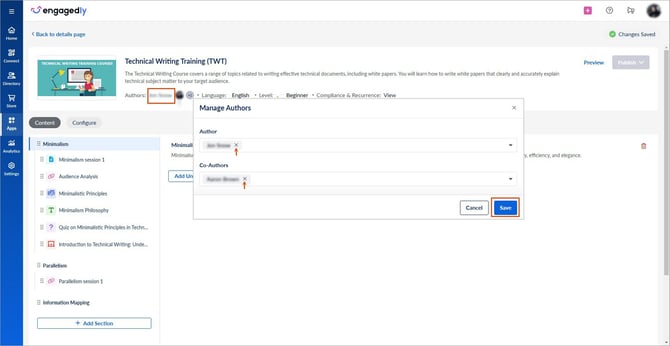
Click the Cancel  icon next to the author or co-author you want to remove, and then click Save.