![Engagedly dark.png]](https://help.engagedly.com/hs-fs/hubfs/Engagedly%20dark.png?height=31&name=Engagedly%20dark.png)
Admins can add and manage reasons for blocking employees within the system. These reasons help track and document why an employee account was blocked, such as policy violations, security concerns, employee separation, or organizational decisions. When blocking an employee, admins can select a predefined reason from this list.
Add a reason
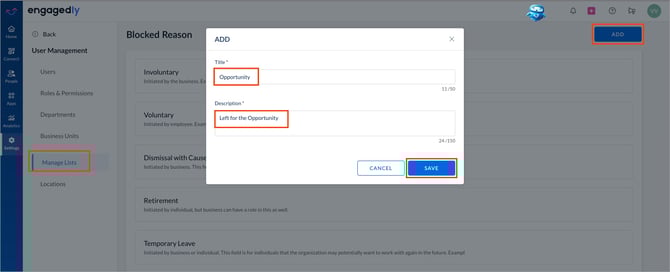
Navigate to Settings > User Management > Manage Lists.
- Scroll down to Blocked Reason.
- Click ADD on the right.
- Enter the title and description.
- Click SAVE.
Manage a reason
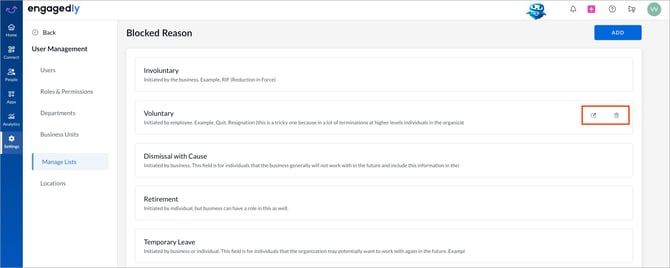
After creating a reason, you can edit or delete it if required. A deleted reason is no longer available for selection when blocking employees.
Hover over the reason and do one of the following:
- Click the Edit
 icon to update the reason.
 - Click the Delete
 icon to remove the reason.
📒Note: If a reason is deleted, it still remains associated with employees who were previously blocked using that reason.