![Engagedly dark.png]](https://help.engagedly.com/hs-fs/hubfs/Engagedly%20dark.png?height=31&name=Engagedly%20dark.png)
Addressing all discussion points helps teams make effective decisions and track progress in recurring meetings. If some topics remain unresolved due to time limits or missing information, participants can carry them forward to maintain continuity and follow-up.
The organizer and any participant can add previously unchecked discussion points to the current recurring meeting. Unresolved points that are not marked complete automatically appear in the next recurring meeting. This ensures visibility, accountability, and continued discussion.
📒Note: Participants can also view previously unchecked points in non-recurring meetings with the same participants.
Navigate to Apps > Meetings > My Meetings.
- Select a meeting to open the "Meeting Details" page.
- For a recurring meeting, click the required timeline to add the previously unchecked points.
- Go to the Discussion Points tab.
- Under “Previously unchecked points”, click a discussion point to add it to the current meeting.
- Update it if required.
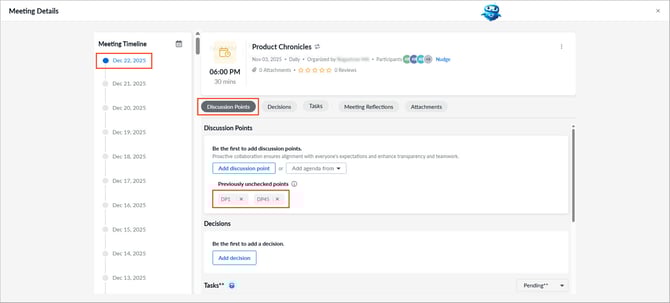
After adding previously unchecked points, you can add other discussion points, add a section, add notes, or manage them as required.