![Engagedly dark.png]](https://help.engagedly.com/hs-fs/hubfs/Engagedly%20dark.png?height=31&name=Engagedly%20dark.png)
A proficiency scale defines expertise levels for competencies, from beginner to expert. It helps identify gaps, guide learning, development, and support succession planning.
Admins configure proficiency scales to standardize how competencies are assessed across the organization.
Use a predefined scale
Engagedly provides a recommended proficiency scale that you can apply.
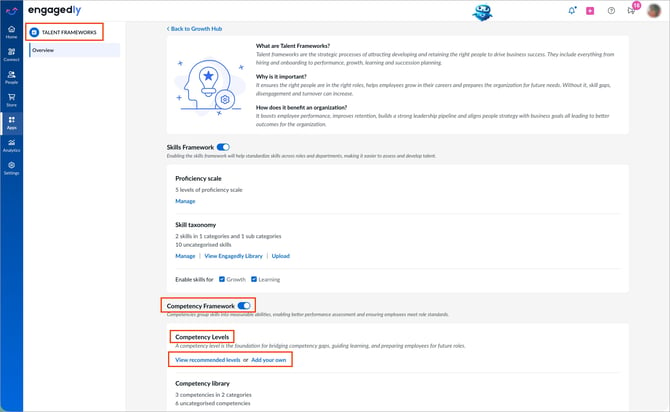
Navigate to Settings > Talent Frameworks.
If you have an active subscription to Engagedly's Growth app, you can also access Talent Frameworks from Apps > Growth > Settings.
- Go to Competency Framework and ensure it is enabled.
- In the “Competency Levels” section, click View recommended levels.
- Click Use this to apply the scale.
Create a custom scale
You can create a custom proficiency scale to match your organization’s requirements.
- In the “Proficiency scale” section, click Add your own.
- Enter a title and description for each proficiency level.
- Click + Add to include more levels or the Delete
 icon to remove a level.
 - Click Create to save the scale.
📒Notes:
- After creation, you cannot delete a proficiency scale. However, you can add levels or edit the scale at any time.
- After creation, only the “Manage” option appears in the “Proficiency scale” section.
To edit
- In the “Proficiency scale” section, click Manage.
- Make necessary changes and click Save.