![Engagedly dark.png]](https://help.engagedly.com/hs-fs/hubfs/Engagedly%20dark.png?height=31&name=Engagedly%20dark.png)
Employees can create Individual Development Plans (IDPs) to set personalized goals, identify skills and training they need to advance their careers. This process empowers employees to take ownership of their growth and align their development plans with the organization’s objectives.
Admins can create IDPs for employees, while managers can create them for their team members. Employees can create and manage their own IDPs.
Navigate to Apps > Growth > My Growth Hub.
For admins: Open the drop-down, select My Org, and then select an employee.
For managers: Open the drop-down, select a team, and then select an employee.
Create an IDP
- Click Create Development Plan at the top right.
- Enter a title and description.
Click the Marissa AI .png?width=18&height=20&name=Marissa%205@2x%20(2).png) icon to generate a description based on the title.
icon to generate a description based on the title.
3. Set the start and end dates.
4. Select skills and competencies and click Save.
📒Note: The Skills and Competencies sections appear only if admins configure them.
Manage an IDP
After creating IDPs, admins and managers can track and manage employees' development plans, and employees can monitor their own plans to ensure alignment with their growth goals.
💡Tip: Employees can manage their IDPs, regardless of who creates them.
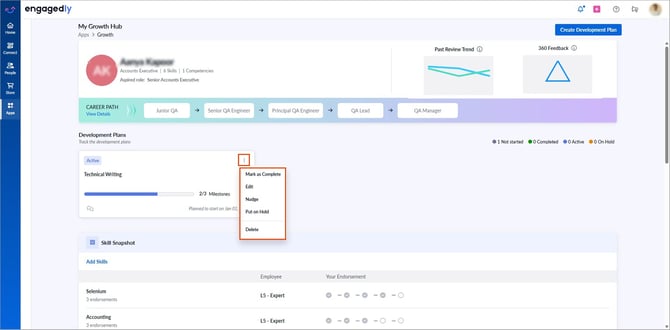
Click the Overflow  Menu on an IDP for additional actions.
- Mark as Complete: Close the IDP when it is achieved.
After marking an IDP complete, click Make IDP Active to reactivate it.
📒Note: You cannot add milestones to a completed IDP. Reactivate the IDP to add new milestones.
- Edit: Modify the IDP details.
- Put on Hold: Temporarily pause progress on an IDP.
After putting an IDP on hold, click Resume IDP to continue.
📒Note: Pausing an IDP disables its milestones, but you can still add new ones.
- Add to Meeting: Include the IDP in a meeting agenda.
- Delete: Remove the IDP and all associated milestones.
📒Note: Deleting an IDP is irreversible.
Nudge employees
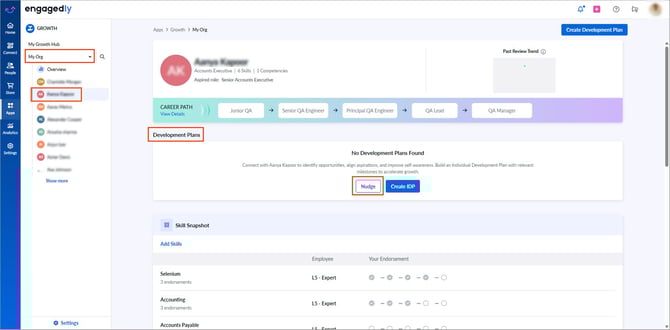
Admins and managers can encourage employees to create IDPs.
-
In the "Development Plans" section, click Nudge.
2. Enter your message and click Send.
By actively managing IDPs, admins and managers can play a key role in supporting employees' career development and aligning their growth with organizational goals.