![Engagedly dark.png]](https://help.engagedly.com/hs-fs/hubfs/Engagedly%20dark.png?height=31&name=Engagedly%20dark.png)
After completing a course, learners can view and download the course certificate. They can also upload certificates for courses completed outside the platform and manage them when required.
📒Note: You can view a certificate only if the course author enables certification.
Download a certificate
After completing a course, you are redirected to the review page. Once you submit feedback, the course details page opens, where you can download your certificate.
You can also download the certificate manually by following these steps:
Navigate to Apps > Learning > My Learning.
- In the “My Learning” tab, scroll to the “Active” section and click View All on the right.
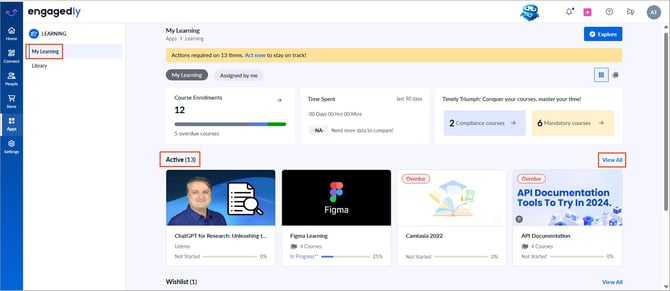
2. Open the “Completed” tab and select a course.
3. In the “Certification” section, click View Certificates.
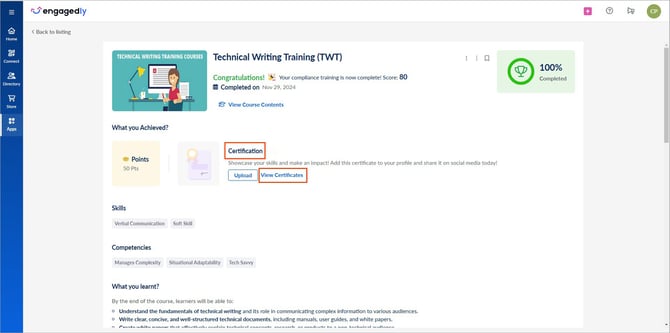
4. Hover over the certificate and click the Download  icon.
icon.
📒Note: Learning paths do not have certificates. However, learning paths include multiple courses that may include certificates.
Upload a certificate
You can upload certificates for relevant courses completed outside the platform.
- Open a completed course.
- In the “Certification” section, click Upload.
- Enter the necessary details and click Save.
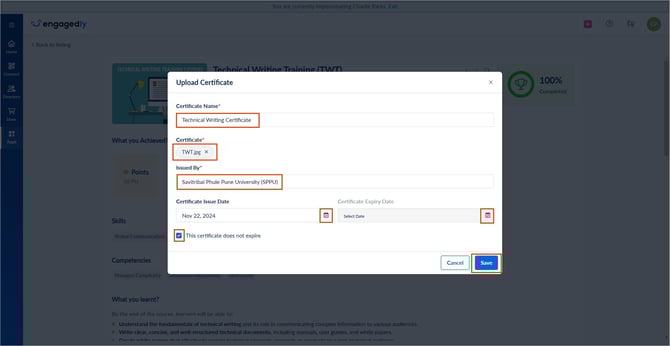
You can choose to leave the certificate expiry date blank if it does not apply.
Manage a certificate
You can manage uploaded certificates at any time.
- Open a completed course.
- In the “Certification” section, click View Certificates.
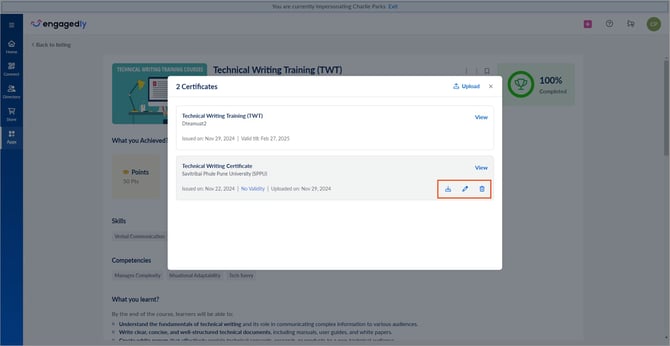
- Hover over an uploaded certificate and click one of the following:
- Click the Download icon to download the certificate.
- Click the Pen
 icon to edit the certificate details.
 - Click the Delete
 icon to remove the certificate.