![Engagedly dark.png]](https://help.engagedly.com/hs-fs/hubfs/Engagedly%20dark.png?height=31&name=Engagedly%20dark.png)
The goal creator, assigner, or owner can update a goal's details, such as its title, description, duration, visibility, priority, and categories, from the goal details page.
Navigate to Apps > Goals.
- Open the goal you want to modify.
- Click the Overflow
 Menu at the top right of a goal.
 - Select Edit.
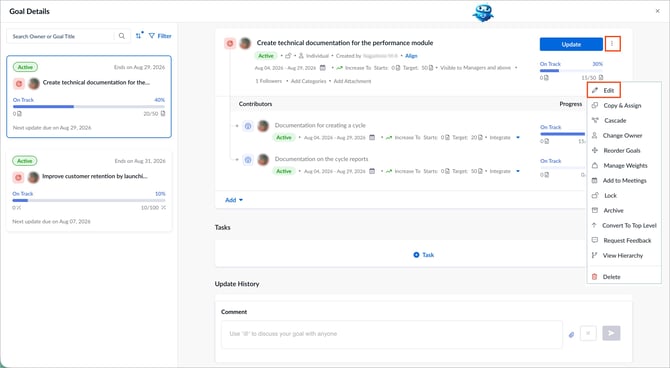
4. Modify the goal details, such as title, description, level (if you are an admin), duration, measurement type, visibility, priority, categories.
5. (Optional) Add key results, contributing goals, or cascade the goal.
6. Click Save to apply the changes.
📒Note: To edit only the goal title, click the title field directly on the goal details page.