![Engagedly dark.png]](https://help.engagedly.com/hs-fs/hubfs/Engagedly%20dark.png?height=31&name=Engagedly%20dark.png)
Engagedly’s Rewards app is available for your account only after the subscription. You can then enable it for your organization.
Navigate to Settings > Engagedly Apps.
- Scroll through the list of available apps and locate REWARDS.
- Use the toggle to enable the app.
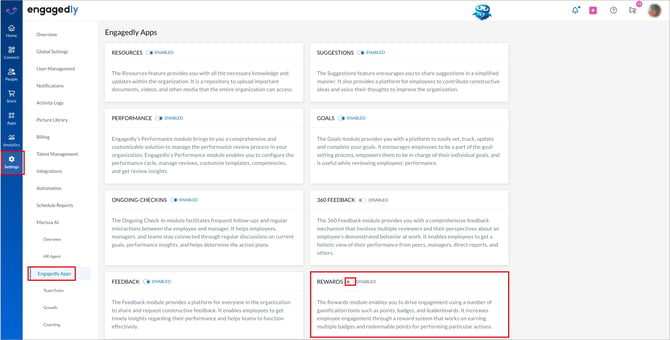
The system applies changes immediately.
Follow the same steps to disable or re-enable the app at any time based on your organization’s subscription and requirements.
To subscribe to any other app, contact our support team.
📒Notes:
-
You can enable only the apps that your organization has subscribed to.
- After disabling the app, employees can no longer access or use it. Changes may take a few minutes to reflect.