![Engagedly dark.png]](https://help.engagedly.com/hs-fs/hubfs/Engagedly%20dark.png?height=31&name=Engagedly%20dark.png)
Admins can import job titles through a bulk Excel upload, and can also import job title-to-competency and job title-to-job-level mappings the same way. This allows them to build consistent, scalable job titles and mappings that align with the organization's needs, without manually creating them.
Navigate to Settings > Talent Frameworks.
If you have an active subscription to Engagedly's Growth app, you can also access Talent Frameworks from Apps > Growth > Settings.
- Go to Career Framework and ensure it is enabled.
- Click Manage in the “Job titles” section.
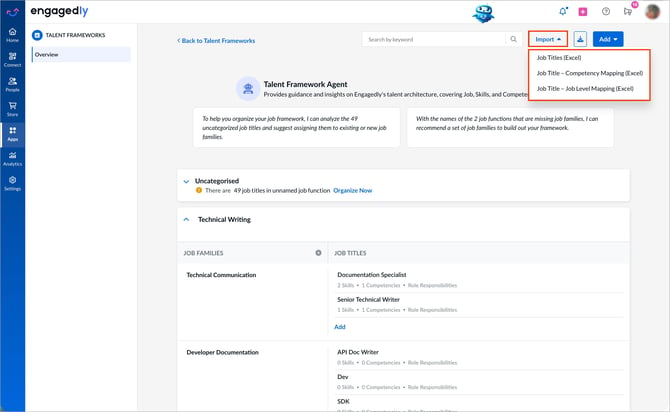
- Open the Import drop-down at the top and select the import type:
-
- Job Titles (Excel) to create job titles in bulk
- Job Title - Competency Mapping (Excel) to map competencies to job titles in bulk
- Job Title - Job Level Mapping (Excel) to map job titles to job levels in bulk
4. Click the Sample file to download the template.
5. Open the downloaded file, enter the required information, and save it.
6. Return to Engagedly, click Upload, and then click Import.