![Engagedly dark.png]](https://help.engagedly.com/hs-fs/hubfs/Engagedly%20dark.png?height=31&name=Engagedly%20dark.png)
Table of contents
1. Introduction
Butterfly EI (Employee Insight) is a continuous employee engagement and feedback app that enables organizations to collect real-time employee feedback, analyze workforce sentiment, and provide actionable insights to managers.
Enabling Butterfly EI with Engagedly allows organizations to centralize employee engagement data and access Butterfly EI insights within Engagedly, ensuring a streamlined and connected user experience.
2. Configuration
Admins must contact our support team to enable Butterfly EI for their organization. Once enabled, configure the settings to allow access within Engagedly.
Prerequisites
- Active subscription to both Butterfly EI and Engagedly.
- Butterfly EI enabled in Engagedly for your organization.
- Admin and manager access to both Butterfly EI and Engagedly.
2.1. Enable Butterfly EI
After our support team enables Butterfly EI, the system grants access to “Everyone” in your organization by default.
Modify access settings if you want to restrict or customize visibility.
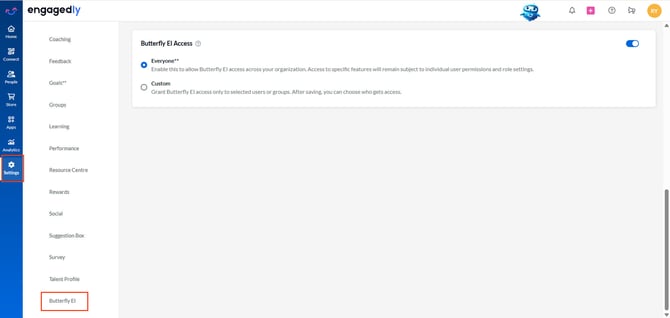
Navigate to Settings > Butterfly EI (at the bottom of the page).
- Use the toggle to enable or disable Butterfly EI Access.
- Select one of the following options:
-
Everyone: Allow Butterfly EI access across the organization.
📒Note: Access to specific features depends on individual roles and permissions.
- Custom: Allow only selected employees or employee fields.
- After selecting “Custom”, click Add Rule to define access criteria.
- Select the required rule type, action, and value.
- Click Save after adding the rules.
📒Notes:
- When you select “Custom”, at least one rule must remain. You can delete additional rules as required.
- Configure the required rule types in your organization before creating the rule.
Once saved, only employees who match the defined rule criteria can access Butterfly EI.
Butterfly EI is successfully configured in Engagedly.
To disconnect:
- Use the toggle to disable Butterfly EI access for your organization.
3. Access Butterfly EI features
After configuration, the Butterfly EI app in Engagedly provides access to the following features: Overview, Pulse, Instant Feedback, Nurture, Yearly, Pulse (New), and Kiosk. These features enable admins and managers to access engagement insights, launch surveys, monitor response data, collect real-time feedback, and manage employee engagement activities.
To access:
Navigate to Apps > Butterfly EI.
ℹ️Additional information:
- Admins can access all features, while managers have limited access.
- By default, employees cannot access Butterfly EI. They can only submit survey responses through the link they receive via SMS, email, or pending actions.
- You can assign the “Butterfly EI Manager” permission to any employee. This permission allows them to:
- Configure and launch surveys for their direct reports.
- Access survey results for their direct reports.
- It does not allow them to modify system roles or access historical data across the organization.
To learn more about Butterfly EI features and functionality, visit the Butterfly EI Help Center.