![Engagedly dark.png]](https://help.engagedly.com/hs-fs/hubfs/Engagedly%20dark.png?height=31&name=Engagedly%20dark.png)
After creating a learning path, authors can manage it even after publishing. Authors can edit, delete, push learning paths to the library, or remove them from the library for learning paths they authored.
Admins can assign the “Manage learning path” permissions to anyone in the organization, allowing them to manage learning paths. Learn more in the Overview of user management.
Navigate to Apps > Learning > Author.
- Go to the Authored by you tab and open a learning path.
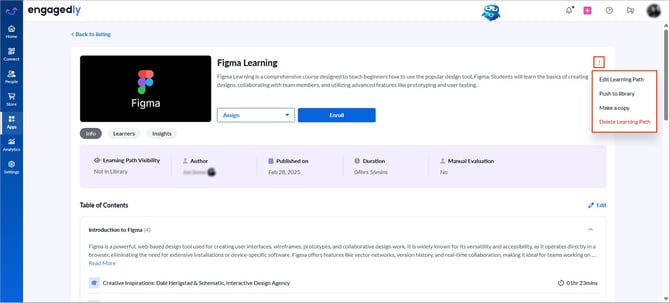
- Click the Overflow
 Menu at the top right and select the required action:
- Edit Learning Path: Modify the learning path content and configure settings.
- Push to library: Publish a learning path to the library.
- Remove from library: Available after publishing a learning path. Remove a published learning path from the library.
- Make a copy: Duplicate the learning path.
- Delete Learning Path: Permanently remove a learning path from the library.
📒Note: If the admin is not an author or co-author, they can only view the “Info” and “Learners” tabs on the learning path details page. Authors and co-authors can view the “Info”, “Learners”, and “Insights” tabs.
After managing a learning path, publish it to assign it to learners.
Authors and co-authors can also manage learners in the learning path if required.