![Engagedly dark.png]](https://help.engagedly.com/hs-fs/hubfs/Engagedly%20dark.png?height=31&name=Engagedly%20dark.png)
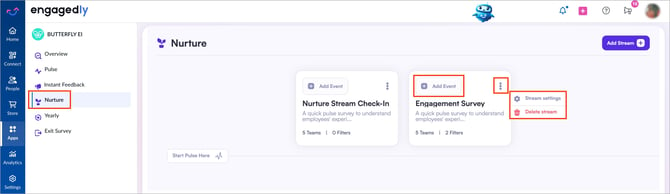
After creating a nurture stream, admins and survey managers can manage it as required. After creating a nurture stream, you can view each nurture as a card.
Navigate to Apps → Butterfly EI → Nurture.
- On a nurture stream card:
- Click + Add Event to send it across the selected audience. For more information, refer to Create a nurture event.
- Click the Overflow
 Menu and select one of the following:
-
- Stream settings: Make the necessary changes to the stream and click Submit to save the changes.
-
- Delete stream: Click Delete stream to confirm.