![Engagedly dark.png]](https://help.engagedly.com/hs-fs/hubfs/Engagedly%20dark.png?height=31&name=Engagedly%20dark.png)
Authors and co-authors can manage learners assigned to a learning. This helps ensure timely completion and accurate tracking of learner progress.
You can
- Nudge learners to complete the learning.
- Remove learners from the learning.
- Reset learners’ progress.
- View learners’ recurrence history, compliance history, or both.
You can perform these actions for individual learners or multiple learners. You can also nudge directly from the dashboard.
Manage individual learners
Navigate to Apps > Learning > Author.
- Go to the Authored by you tab and open a learning.
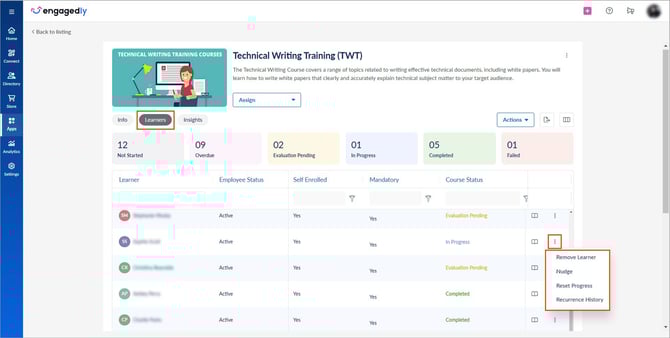
- Go to the Learners tab and click the Overflow
 Menu next to a learner.
 - Select the required action:
- Remove Learner
- Nudge
- Reset Progress
- Recurrence History
💡Tip: You can also nudge a learner by hovering over the “Course Status” field and clicking the Bell  icon.
icon.
Manage learners in bulk
- Go to the Learners tab and click Actions.
- Select Nudge, Remove Learners, Reset Progress, or Import Learners.
- Select all or specific learners as required.
📒Note: You can import learners in bulk using Excel.

ℹ️Additional information:
- If course recurrence is enabled, the “Import Learners” option is not available on the course details page (under the “Learners” tab). If an admin attempts to import learners from the “Author” page, the import fails and appears as “Failed” in the “Import History”. For more information, refer to Import courses, learners, and history.
- While importing learners, enter “Yes” or “No” in the “Award Points on Completion” column based on the learner’s course completion status.
- If you enter “Yes”, the system awards points based on the course configuration.
- If the “Award Points on Completion” column is left blank, the system defaults to "No" and points are not awarded.
- Points are awarded only if your organization has an active subscription to the Rewards app; otherwise, this field is ignored.
- Contact our support team to enable or verify your rewards settings.
Nudge learners from the dashboard
You can nudge learners and assign learning from the dashboard across various sections.
- Learner Engagement
- Completions Report
- Overdue Aging
- Mandatory Enrollments Status
- Compliance Status
- Learning Progress
For admins: Navigate to My Org > Overview.
For managers: Navigate to My Team or My Entire Team > Overview.
- Click the Right
 Arrow in the required field.
 - Click the Bell icon to nudge learners.
ℹ️Additional information:
- Recurrence history is available only for individual learners.
- The “Reset Progress” option appears only after a learner starts a course.
- When you reset progress, learners lose their progress.
- Once a learner starts a course, the Nudge option is no longer available.
- “Recurrence History” is available only for recurring courses and not for non-recurring compliance courses.
- When you nudge learners in bulk, only inactive learners and those who have not completed the learning receive notifications.