![Engagedly dark.png]](https://help.engagedly.com/hs-fs/hubfs/Engagedly%20dark.png?height=31&name=Engagedly%20dark.png)
Admins manually review and approve or decline employee redemption requests for custom rewards. You can view details such as redeemed points, order information, and the request date before taking action.
Approve or decline a request
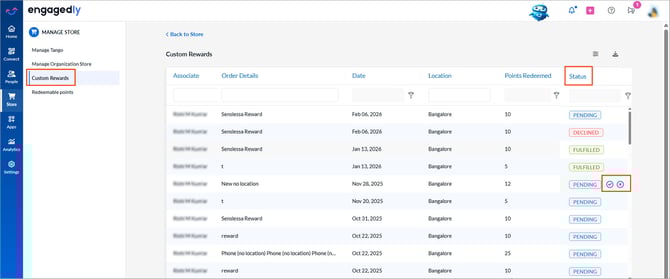
Navigate to Store > Settings > Custom Rewards.
- Scroll to the right to view the “Status” column.
- Hover over the “Pending” status.
- Do one of the following:
-
-
Click the Tick
 icon to approve.
 - Click the Cancel
 icon to decline.
-
4. (Optional) Enter a message.
5. Click SAVE.
Export requests report
Navigate to Store > Settings > Custom Rewards.
-
Click the Download
 icon at the top right to export the report.