![Engagedly dark.png]](https://help.engagedly.com/hs-fs/hubfs/Engagedly%20dark.png?height=31&name=Engagedly%20dark.png)
Admins can define the competencies required for each job level (for example, Entry Level, Mid Level, Senior Level, or Executive), and specify the proficiency level required for each competency. You can map competencies manually or import them in bulk using a mapping file.
Map competencies manually
Navigate to Apps > Growth > Settings.
- Go to Career Framework and ensure it is enabled.
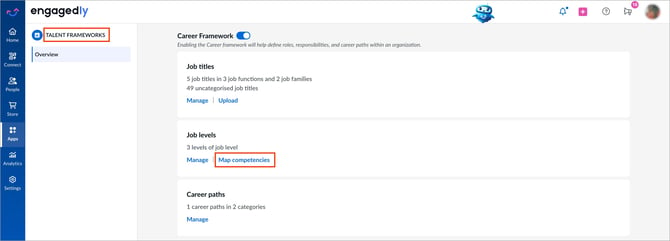
- In the “Job levels” section, click Map competencies.
- Expand the job level you want to configure.
- Click Map competencies to open the mapping panel.
5. Expand a competency category to view the available competencies.
6. Select the competencies required for the job level.
7. For each selected competency, set the required proficiency level.
Notes:
- The “Map competencies” option appears only after you create job levels.
-
If the proficiency level is not set, the first level in the proficiency scale is selected by default.
8. Click Save to apply the mapping.
The selected competencies are mapped to the job level, and the job level card displays the updated mapping.
Map competencies by importing a file
Navigate to Apps > Growth > Settings.
- Go to Career Framework and ensure it is enabled.
- In the “Job levels” section, click Map competencies.
- Click Import competencies at the top right.
- Click Sample file to download the template.
- Open the downloaded template and enter the necessary details.
- Save the completed template.
- Return to Engagedly and click Upload.
- Select the completed template.
- Click Import.
📒Note: Job levels and competencies are matched using their respective codes. The required proficiency level is matched using its title or name. Rows containing unmatched job levels, competencies, or proficiency levels are automatically skipped during import.
ℹ️Additional information:
- You can export the current competency-to-job-level mapping for review or to use as a template before importing updates.
- The exported file is sent to your registered email address.
- If the same competency is mapped to a job level and a job title at different proficiency levels, the higher proficiency level takes precedence. For example, if a job title requires Problem Solving at L3 and the employee’s job level requires it at L2, the employee’s required proficiency level is L3.
- You can also link job titles to job levels through the job title import. When you link a job title to a job level, it inherits all competencies mapped to that job level. For more information, refer to Map job titles to career paths, skills, competencies and job levels.