![Engagedly dark.png]](https://help.engagedly.com/hs-fs/hubfs/Engagedly%20dark.png?height=31&name=Engagedly%20dark.png)
Mapping job titles connects each role to a career path, job level, and the skills and competencies required for career progression. This makes career paths actionable and helps employees understand the expectations for each role and level.
After creating career paths, admins can add job titles and map them to the appropriate skills, competencies, and job levels.
Map job titles to career paths
Navigate to Settings > Talent Frameworks.
If you have an active subscription to Engagedly's Growth app, you can also access Talent Frameworks from Apps > Growth > Settings.
- Go to Career Framework and ensure it is enabled.
- In the “Career paths” section, click Manage.
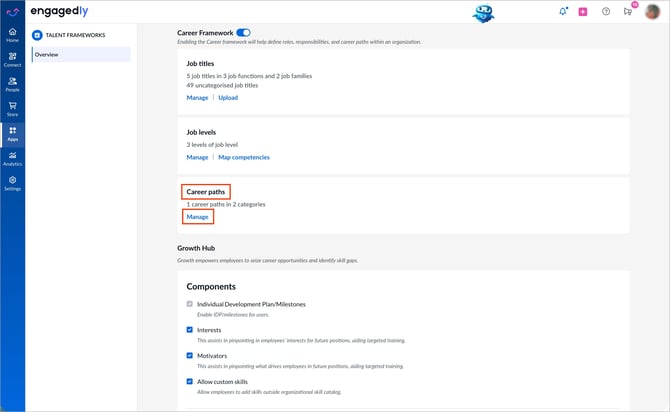
The system redirects you to the career path framework page.
3. Hover over a level on the right side of the career path and click Add Job Title.
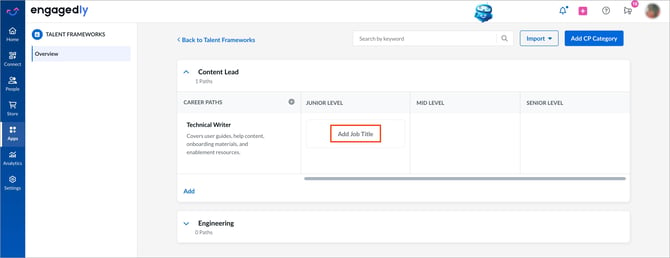
4. Search for and select a job title, then click Add.
Options:
- Add job titles to any level.
- Add multiple job titles within a level.
- Include another job title between two mapped titles.
To manage:
- Hover over a mapped job title at any level and click the Delete
 icon to remove it.
 - Click the Plus
 icon between two mapped job titles to include another job title in between.
Map job titles to job levels
The system links a job title to a job level, which determines which level-based competencies the job title inherits.
Navigate to Settings > Talent Frameworks.
If you have an active subscription to Engagedly's Growth app, you can also access Talent Frameworks from Apps > Growth > Settings.
- Go to Career Framework and ensure it is enabled.
- In the "Job titles" section, click Manage.
- Select a job title, then open the Job Level tab.
- Select a job level from the drop-down to associate it with the selected job title.
- Click Save and Next to continue.
Once a job title is associated with a job level, the system automatically applies any competency mapped to that level to the job title.
Map job titles to skills and competencies
Navigate to Settings > Talent Frameworks.
If you have an active subscription to Engagedly's Growth app, you can also access Talent Frameworks from Apps > Growth > Settings.
- Go to Career Framework and ensure it is enabled.
- In the “Job titles” section, click Manage.
- Click Skills or Competencies below a job title.
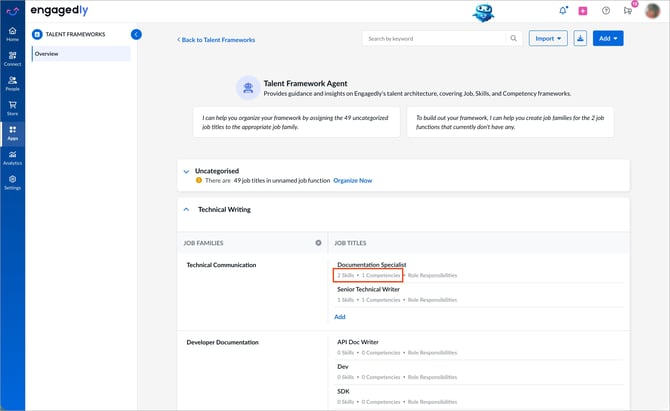
The system directs you to the respective section to map the required attributes.
4. Use the available tabs to perform additional actions:- Requirement & Responsibilities: Manually type job requirements and responsibilities, or click the Marissa
-4.png?width=18&height=20&name=Marissa%205@2x%20(2)-4.png) icon to generate them automatically.
icon to generate them automatically. - Job Level: Associate the job title with a job level.
- Map Skills: Assign relevant skills to the job title and set proficiency levels.
- Map Competencies: Assign relevant competencies to the job title and set proficiency levels.
- Summary: View a clear overview of how the job title is mapped to skills and competencies, including its requirements and responsibilities.
5. After configuring each tab, click Save and Next at the top right to continue.
Manage mapped components
- Go to the Summary tab.
- Click the Pen
 icon next to the component that needs editing.
 - Make the necessary changes and click Save and Next at the top right to continue.
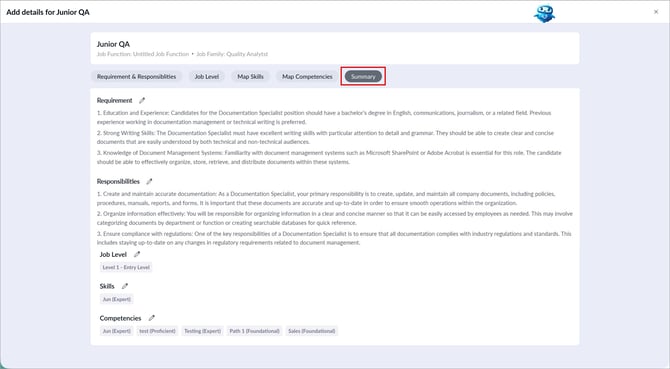
📒Note: When a job title is mapped to a job level, the “Summary” section displays both the competencies inherited from the job level and the competencies mapped directly to the job title.
Employee view
When employees select a career path, they can view the mapped job titles along with the required skills, competencies, and responsibilities. This helps them understand what is expected and how they can progress in their careers.