![Engagedly dark.png]](https://help.engagedly.com/hs-fs/hubfs/Engagedly%20dark.png?height=31&name=Engagedly%20dark.png)
Admins can nudge respondents during the cycle to remind them to complete their pending 360 feedback, ensuring the timely completion of the review process.
Navigate to Apps > 360 Feedback > Cycles.
- Click Manage for a cycle where you want to send nudges.
- Go to the Dashboard tab.
📒Note: The Nudge option is unavailable if the cycle has ended or if the start date is in the future.
3. To nudge an individual reviewer, click the Overflow  Menu for a reviewer and select Nudge.
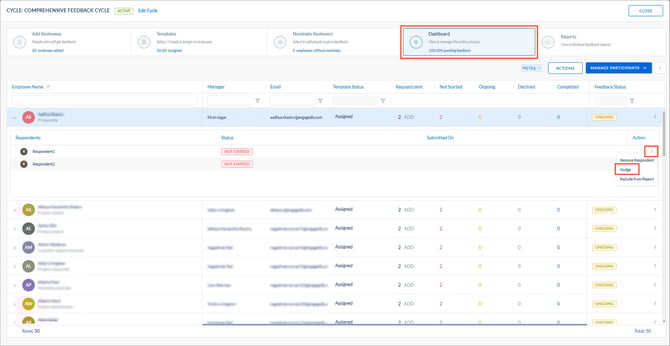
📒Note: The screenshot reflects the admin view.
4. To nudge multiple reviewers at once:
a. Click ACTIONS.
b. Select one of the following:
-
- Employees to add respondents
- All Respondents
- All External Respondents (available only if the option is enabled during cycle configuration)
c. Click SELECT.
5. Select specific or all employees.
6. Enter the subject and message, and click NUDGE to confirm.
Manager actions
Only admins can access the “Cycles” tab.
Navigate to Apps > 360 Feedback > Overview.
- Go to the Manage tab.
- Follow the same steps to nudge reviewees (direct reports) or reviewers.