![Engagedly dark.png]](https://help.engagedly.com/hs-fs/hubfs/Engagedly%20dark.png?height=31&name=Engagedly%20dark.png)
Managers can nudge their direct reports to add their respondents, all respondents, and external respondents to submit their feedback.
Common navigation path
Navigate to Apps > 360 Feedback > Overview.
- Locate the cycle you want to send reminders.
- Click Manage on the right side of a cycle.
- Open the Manage tab.
Option 1: Nudge from bulk actions
- Click ACTIONS on the right.
- Under the “Nudge” section:
-
- Select Employees to add respondents to allow your direct reports to add their respondents.
- Select All Respondents to remind all respondents to submit feedback.
- Select All External Respondents to remind only external respondents to submit their feedback.
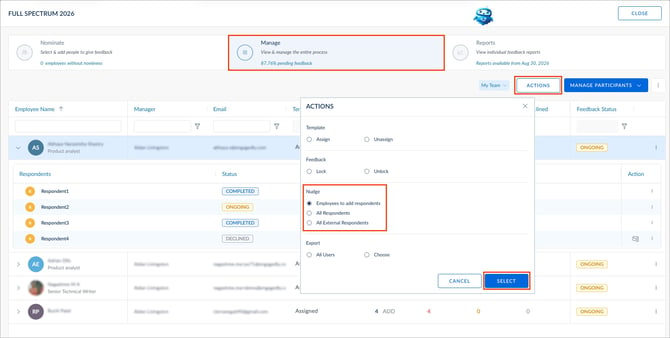
3. Click SELECT.
📒Note: If employees are allowed to add respondents, the option “Employees to add respondents” is visible under the “Nudge” section.
Option 2: Nudge from submission status
- Click the Overflow
 Menu on the right.
 - Select Show Submission Status.
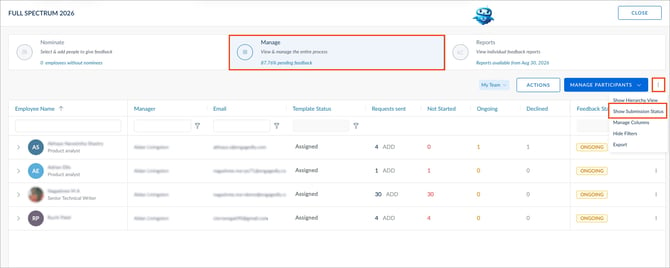
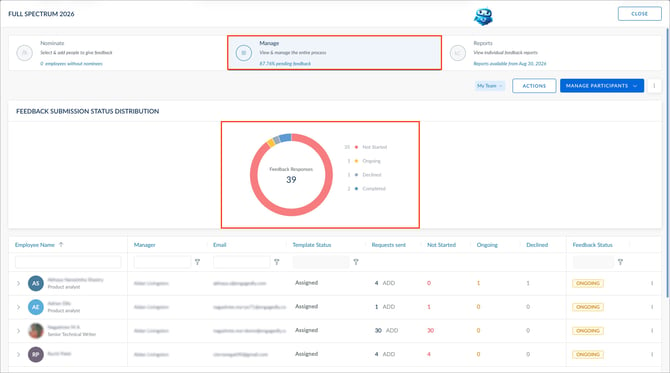
The pie chart displays the response statuses of all respondents.
3. On the pie chart, click a status to view respondents.
-
- If a cycle is anonymous, click YES, NUDGE ALL.
- If a cycle is non-anonymous:
- Click NUDGE on the right for a respondent.
- Click NUDGE ALL at the top right to remind all respondents.
ℹ️Additional information:
- You can nudge respondents with “NOT STARTED” or “ONGOING” status.
- In non-anonymous cycles, you can nudge individual respondents or all respondents.
- In anonymous cycles, you can nudge only all respondents (not individuals).
- In anonymous cycles, respondent names are hidden to maintain anonymity.
Option 3: Nudge an individual respondent
- Click the Down Arrow
 on the left to expand the respondent grid.
 - Click the Overflow Menu on the right for a respondent.
- Select Nudge.
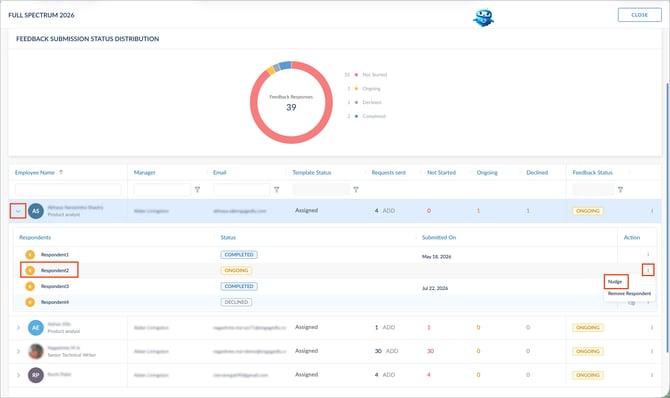
4. (Optional) Edit the subject and message.
5. Click NUDGE.
After you send a nudge, employees receive an in-app notification, an email notification, and a pending action on the homepage.