![Engagedly dark.png]](https://help.engagedly.com/hs-fs/hubfs/Engagedly%20dark.png?height=31&name=Engagedly%20dark.png)
Redeem your earned points for gift cards, experiences, or vouchers available through Tango, Switchfly, or custom rewards if these options are enabled for your organization.
📒Note: You can redeem points only if “Redemption” (Custom Rewards, Tango, or Switchfly) is enabled for your organization.
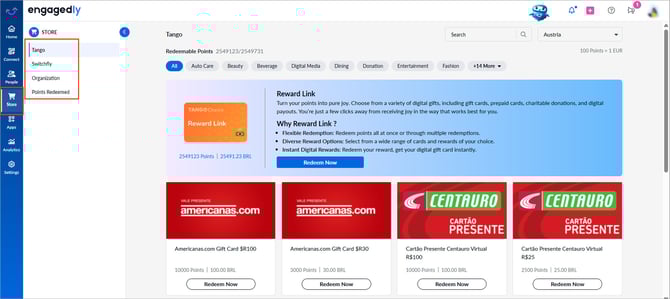
Navigate to the Store.
- View your redeemable points at the top of the page.
- Select a reward source:
-
- Tango: Gift cards and digital rewards
- Switchfly: Travel, experiences, and merchandise
- Organization (Custom rewards): Rewards provided by your organization
Redeem from Tango
- Click Tango.
- Open the drop-down at the top right and select your location.
- Browse the available rewards and click Redeem Now.
-
Click Redeem again to confirm.
Redeem from Switchfly
- Click Explore Now.
You are redirected to Switchfly.
📒Note: Location selection is not available in Switchfly.
Redeem from Organization (Custom rewards)
-
Browse the available rewards and click Redeem Now.
💡Additional information:
- For Tango and custom rewards, you cannot cancel or exchange rewards after redemption.
- Admins can decline your request for custom rewards. If declined, your points are restored.
- Select your residence location to ensure the best booking experience and avoid failures.