![Engagedly dark.png]](https://help.engagedly.com/hs-fs/hubfs/Engagedly%20dark.png?height=31&name=Engagedly%20dark.png)
Learners can self-enroll in courses that include instructor-led training, or authors can assign the course to them. Learners receive pending actions when an author adds:
- Instructor-led training for a course they are enrolled in.
- A new session of a training they already attended.
After starting a course, learners can register for or unregister from a training session at any time.
Register for a training session
Authors can add learners to a course that includes instructor-led training, and allow them to register for a session.
📒Note: If the author adds you directly to a training session after adding you to the course, the “Register” option is disabled.
Navigate to Apps > Learning > My Learning.
The “My Learning” tab displays courses and learning paths you are assigned to or enrolled in the “Active” section.
- Open a course that includes instructor-led training.
- Select a session from the left panel.
- On the right, click Register and then click Confirm.
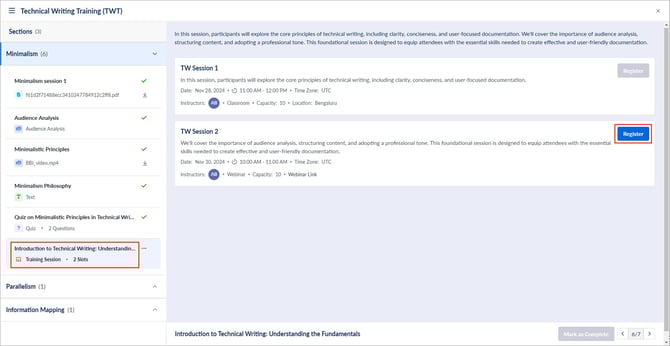
After registration, the session appears on your calendar. Learn more in View my learning calendar.
At the top right, click the Download  icon to download the calendar invite.
Unregister from a training session
After registration, you can unregister from a training session at any time.
- Open a course that includes instructor-led training.
- Select a session from the left panel.
- On the right, click Unregister and then click Confirm.
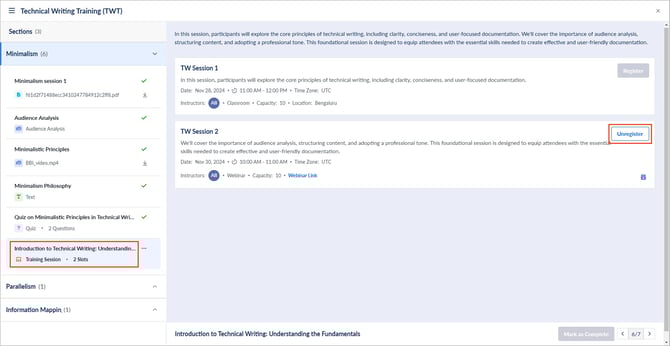
Training completion status
After the session, if the author updates your status from “Pending” to "Attended”, the session appears as “Completed”.
📒Note: Unlike other course units, you cannot manually mark an instructor-led training session as “Completed”.