![Engagedly dark.png]](https://help.engagedly.com/hs-fs/hubfs/Engagedly%20dark.png?height=31&name=Engagedly%20dark.png)
Admins can revoke submitted feedback for a specific respondent and reviewee, allowing the respondent to modify and resubmit their feedback.
You can revoke feedback only when:
- The cycle is non-anonymous.
- The feedback status for the respondent is complete.
- The feedback is not locked.
Navigate to Apps > 360 Feedback > Cycles.
- Locate the cycle you want to revoke feedback.
- Click Manage on the right side of a cycle.
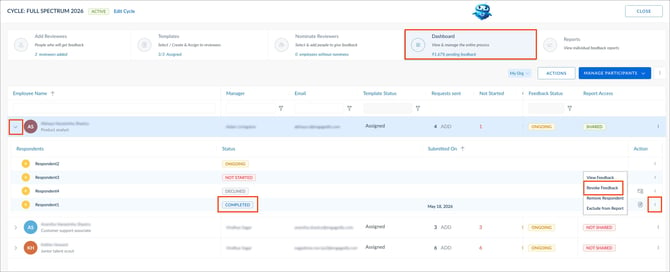
- Open the Dashboard tab.
- Click the Down Arrow
 on the left to expand the respondent grid.
 - Click the Overflow
 Menu on the right for a respondent.
 - Select Revoke Feedback.
7. Click REVOKE to confirm.
📒Note: The “Revoke Feedback” option appears only after feedback is submitted and the status changes to “COMPLETED”.