![Engagedly dark.png]](https://help.engagedly.com/hs-fs/hubfs/Engagedly%20dark.png?height=31&name=Engagedly%20dark.png)
Engagedly provides role-based permissions to manage learning effectively. The key roles involved in learning are Admins, Learning Managers, Authors, and Co-authors.
Learning manager
Admins can assign the learning manager role to anyone in the organization who can
To learn more about assigning roles, refer to the Overview of user management.
Admins can also control who can create courses and learning paths.
By default, anyone in the organization can create learning. To restrict this:
Navigate to Apps > Learning > Settings.
Enable the option Disable Course Creation for Everyone and click SAVE.
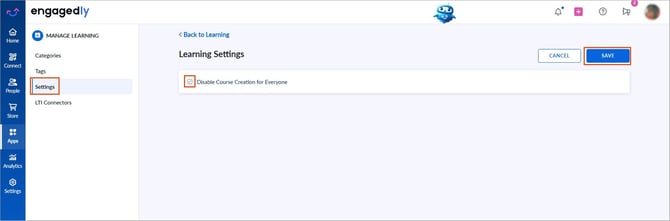
📒Note: When course creation is disabled, only authorized individuals can create learning. Authors can still add anyone in the organization as a co-author for a learning.
Author and co-author
An author is an individual who has permission to create learning content, who can
- Create and manage learning
- Add admins and learning managers as co-authors
Co-authors have the same permissions as authors. Learn more in Add and manage authors.
Authors cannot add employees as co-authors if the employee:
- Does not have learning manager permission
- Does not have permission to create learning
Authors with restricted permissions
If admins allow employees without learning manager permission to create learning, those authors have restricted access to the learning that they create.
Authors without learning manager permission can:
- Create learning
- Manage learning
- Publish learning
- Push to the library
- Manage authors
- Remove learners
- Nudge learners
- Edit due dates (for non-compliance courses)
- Track learners’ progress
- Evaluate learners (if evaluation is enabled)
- Reset learners’ progress
- View and export reports
However, they cannot assign learning.