![Engagedly dark.png]](https://help.engagedly.com/hs-fs/hubfs/Engagedly%20dark.png?height=31&name=Engagedly%20dark.png)
After configuring the points budget, you can allocate, monitor, and manage how points are distributed across various roles. This helps control spending and ensures a structured rewards and recognition program.
Based on the allocated budget over the selected period, you can define which role and individual can award points and badges.
Define who can award points and badges and set the number of points each role can distribute based on the total budget and selected time period.
Navigate to Apps > Rewards > Settings.
- Scroll down to Points Budget.
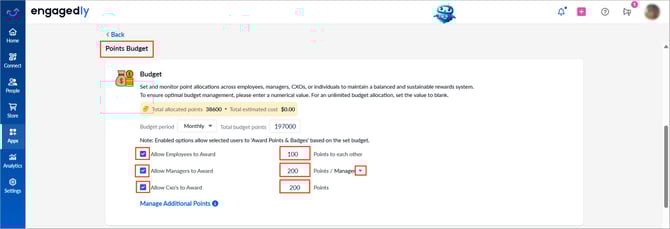
- Under “Budget”, enable the required roles and specify the number of points allocated to each to award others.
The values are auto-saved.
Allocate points
- Allow Employees to Award: Allocate points employees can use to recognize peers.
- Allow Managers to Award: Allocate points managers can use to reward their direct reports or any employee.
- Choose whether points are assigned per direct report or per manager.
📒Note: When per manager is selected, each manager receives the same allocation regardless of the number of direct reports.
-
Allow Cxo’s to Award: Allocate points CxO’s can use to reward any employee.
💡Tip: Allocate points strategically to employees over periodic time durations for maximum budget effectiveness.
To learn more about additional points allocation, refer to Manage additional points allocation.