![Engagedly dark.png]](https://help.engagedly.com/hs-fs/hubfs/Engagedly%20dark.png?height=31&name=Engagedly%20dark.png)
The growth profile consolidates career aspirations, skills, competencies, development plans, and motivators into one view. This helps managers, HR, and talent planners make data-driven, people-centric decisions about succession, mobility, and growth.
How to access the growth profile
Navigate to Apps > Talent Mobility > Talent Discovery.
- Search for employees using a keyword or natural-language query, or use the Sort
 icon to apply search criteria.
 - Click an employee's name on the card to open their growth profile.
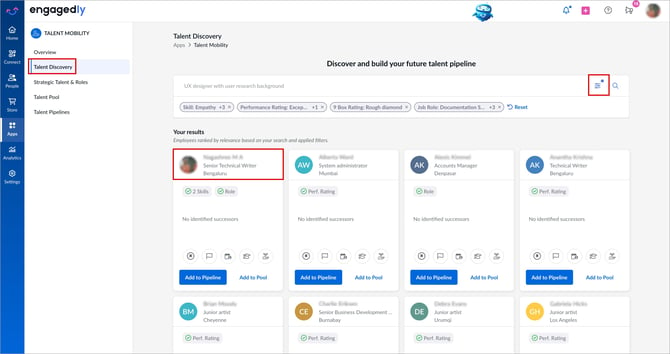
You can also access the growth profile from “Talent Discovery”, “STAR”, or “Talent Pool”. Click the employee’s name to open it.
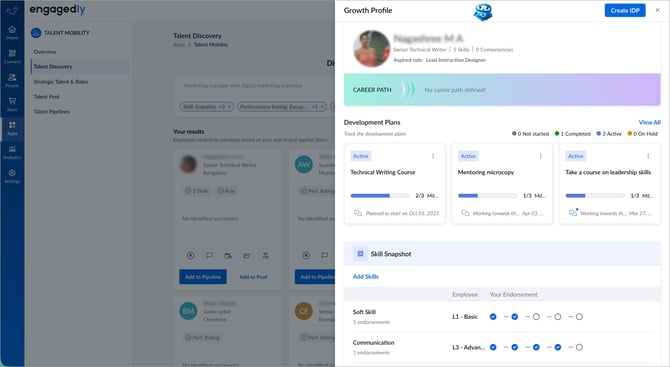
Growth profile opens in a side panel.
Understand sections in the growth profile
Employee summary: Displays the employee's name, current role, total number of skills on record, and total competencies. If the employee has not yet submitted their aspired role, click Send Reminder to prompt them to submit it.
Career path: Shows the employee's defined progression trajectory. Helps align employee aspirations with organizational succession planning.
Development plans: Tracks active Individual Development Plans (IDPs) associated with the employee, including their statuses and milestones. Spot stalled plans or celebrate completed milestones.
Skill snapshot: Lists the employee's skills alongside two data points: the employee's self-assessed proficiency and manager’s endorsement.
Areas for skill enhancement: Provides a gap analysis of the employee's skills against the requirements of their “Current Role” or an “Aspired Role”.
Insights panel summarizes key skill readiness signals:
- The number of skills ready to begin development
- The number of skills that require proficiency improvement for the current role
The recommendations panel suggests assigning learning resources and development plans tailored to the employee's growth needs, organizational trends, and peer upskilling data.
Competencies snapshot: Shows the employee's competencies mapped against the requirements of their current or aspired role. For each competency, you can see the required proficiency level (example, L1) and the manager's endorsement level.
An Insights panel within this section provides a breakdown of:
-
Competencies required for the current role
- Competencies required for the aspired role
- Competencies where required proficiency is already achieved
Interests and motivators: Captures the employee's personal interests and motivators. The employee or manager can add this information.
Activity: Provides a chronological log of all talent-related actions for the employee, including being added to pipelines, succession plans, and readiness stage changes.
💡Tip: Review the activity log before making talent decisions. It helps you understand previous assessments, avoid duplicate actions, and track employee progress across talent programs.
To learn more about the growth profile, refer to My growth hub.