![Engagedly dark.png]](https://help.engagedly.com/hs-fs/hubfs/Engagedly%20dark.png?height=31&name=Engagedly%20dark.png)
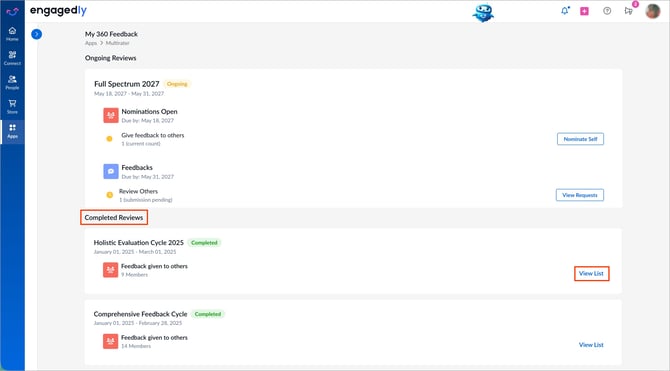
Under “Completed Reviews”, locate the required cycle.View the feedback you submitted for your colleagues.
If respondent anonymity is enabled in the cycle configuration, your identity remains hidden from reviewees, admins, and managers, as defined by the cycle configuration.
Navigate to Apps > 360 Feedback > My 360 Feedback.
- Under “Completed Reviews”, locate the required cycle.
- Click View List.
3. Hover over the reviewee’s name and click View.
4. Review the feedback you provided.
5. Click the Download  icon at the top right to export.
📒Note: If importance rating is enabled for the cycle, you can see which competencies, behaviors, or categories you marked as “Important.” Your selections count toward the employee’s importance rating percentage. If you left an item unchecked, it counts as not important. For more information, refer to Understand importance rating in 360 feedback report.