![Engagedly dark.png]](https://help.engagedly.com/hs-fs/hubfs/Engagedly%20dark.png?height=31&name=Engagedly%20dark.png)
View your team members’ earned and redeemed points, rankings, and badge details from the Rewards app.
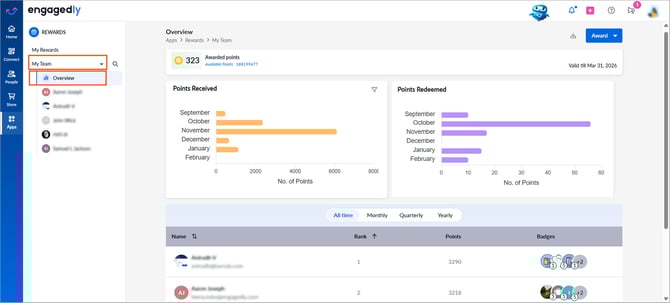
Navigate to Apps > Rewards.
- Select a team: My Team, My Secondary Team, or My Entire Team.
- Click Overview.
- View the summary at the top:
-
- Awarded points
- Available points
- Validity period (if applicable)
4. Review the “Points Received” and “Points Redeemed” charts.
5. Scroll down to view your team’s leaderboard.
6. Use the filter to select a period.
7. View each team member’s rank, total points, and earned badges.
8. Click a graph to open the detailed report, then click Export at the top right to download it.
9. Team member-level view
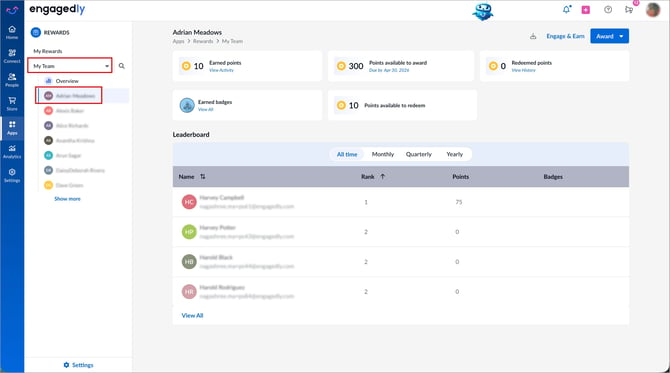
Select a team and then select a team member from the left panel to view their earned points, badges, available points to award (if your organization enables award points), redeemed points, available points to redeem and leaderboard rank.
9. Export reports
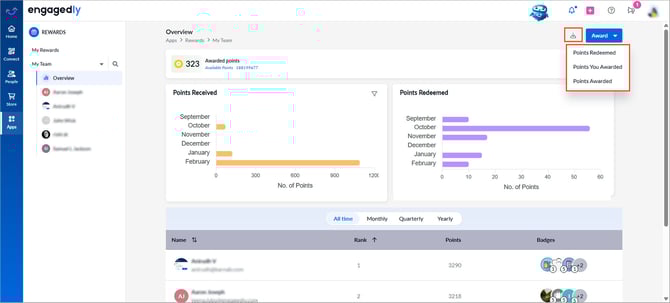
- Click the Download
 icon at the top right.
 - Select the desired option: Points Redeemed, Points You Awarded, or Points Awarded.
- Click the Overflow
 Menu at the top right and select Export.