![Engagedly dark.png]](https://help.engagedly.com/hs-fs/hubfs/Engagedly%20dark.png?height=31&name=Engagedly%20dark.png)
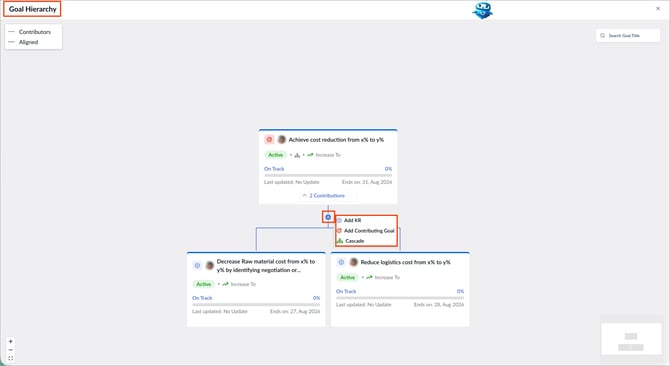
View the complete goal hierarchy, including key results, contributing goals, and aligned goals. Anyone with permission to view the goal, including the goal creator, assigner, owner, or users granted goal visibility, can view the goal hierarchy.
📒Note: If you do not have permission to view a goal in the hierarchy, the system masks that goal, even if you have permission to view other goals in the same hierarchy.
Navigate to Apps > Goals.
- Open the goal whose hierarchy you want to view.
- Click the Overflow
 Menu at the top right of a goal.
 - Select View Hierarchy.
- (Optional) On the “Goal Hierarchy” page, hover over the Plus
 icon to add a key result, contributing goal, or cascading goal.