![Engagedly dark.png]](https://help.engagedly.com/hs-fs/hubfs/Engagedly%20dark.png?height=31&name=Engagedly%20dark.png)
Enable Switchfly to allow employees to redeem reward points for experience-related rewards such as hotels, cabs, and activities. You can add funds and control availability by location.
Navigate to Settings > Rewards > Settings.
- Add funds
- Contact our support team to add funds to the organizational account.
- After payment confirmation, the Engagedly’s team updates the amount and transaction ID in your internal wallet.
- After adding funds, the admins enable Switchfly for their organization.
- Under “Redemption”, scroll down to Switchfly.
- Switch the toggle to enable Switchfly for your organization.
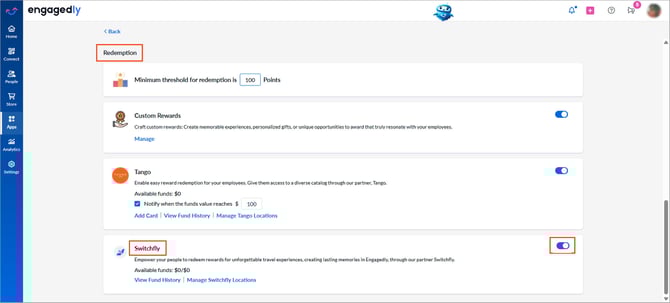
📒Note: Employees can redeem rewards only when sufficient funds are available.
- Set point-to-currency conversion rates for each location and currency.
- Refer to the Manage currency conversion to add or remove locations.
- Click Manage Switchfly Locations and use the toggle to enable or disable locations.
Employees from enabled locations can redeem rewards.
- Click View Fund History to view detailed records of all fund transactions, including allocations, usage, and remaining balance.
- Click the Download
 icon at the top right to export the transaction history.