![Engagedly dark.png]](https://help.engagedly.com/hs-fs/hubfs/Engagedly%20dark.png?height=31&name=Engagedly%20dark.png)
After creating a survey, authors can import questions into it if required. Engagedly offers a set of questions designed by industry experts to help create effective surveys. The available questions differ for general surveys and engagement surveys.
You can share a survey only after adding questions.
⚠️Warning: Importing, adding, or modifying questions after sharing the survey may affect the collected responses. Respondents who have already submitted the survey cannot answer questions added later.
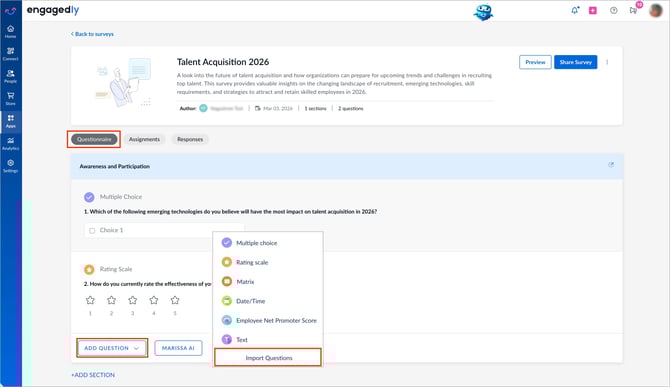
After creating a survey, you are redirected to the “Questionnaire” tab by default, where you can add sections and questions. You can also add questions at any time.
Import questions
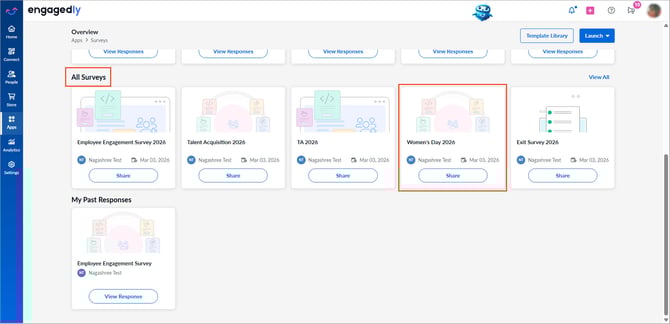
Navigate to Apps > Surveys.
- Scroll down to All Surveys.
- Open the required survey.
3. In the "Questionnaire” tab, open the ADD QUESTION drop-down under a section.
4. Click Import Questions.
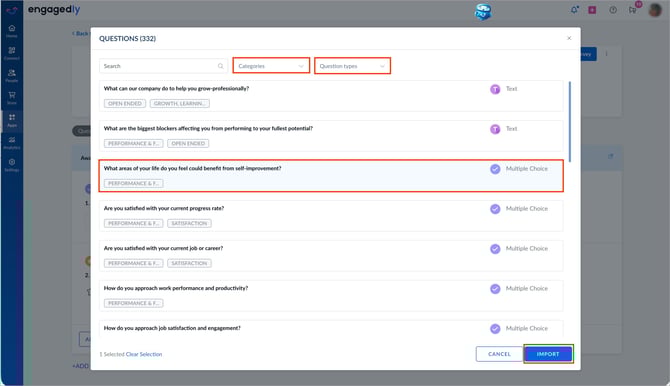
5. Use the Categories and Question types drop-down filters to filter questions.
6. Select the questions to import and click IMPORT.
After importing questions, manage them if required.