![Engagedly dark.png]](https://help.engagedly.com/hs-fs/hubfs/Engagedly%20dark.png?height=31&name=Engagedly%20dark.png)
The meeting notetaker agent (Marissa AI) automatically captures meeting notes and summaries. Once the agent is enabled for your organization, meeting organizers can manage it for individual meetings.
📒Note: If the agent is not available, your admin must enable and configure it. If you are an admin, refer to Configure Marissa and agent settings for more details.
How it works
By default, the notetaker agent is enabled when organizers create a meeting. The agent attempts to join the meeting at the scheduled time, and the organizer must admit it before it can participate.
The agent records notes only for meetings where it is enabled. Organizers can deny the agent from joining the meeting if required.
If the meeting does not occur for two consecutive sessions, the agent still attempts to join the meeting. If the meeting does not occur for the third time, the agent does not join automatically. However, the organizer can manually enable it again for the fourth meeting.
📒Notes:
- Admin must enable the agent to allow employees to use it.
- When an organizer enables or disables the agent, the change applies only to future meetings.
Enable the agent for a meeting
Organizers can enable the agent when creating a meeting. For more information, refer to Create a meeting.
Disable the agent for a meeting
Navigate to Apps > Meetings > My Meetings.
-
Select a meeting to open the “Meeting Details” page.
-
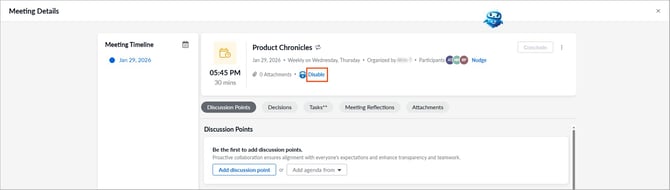
Below the meeting details, click Disable next to Marissa.
Re-enable the agent
- Select a meeting to open the “Meeting Details” page.
- Click the Overflow
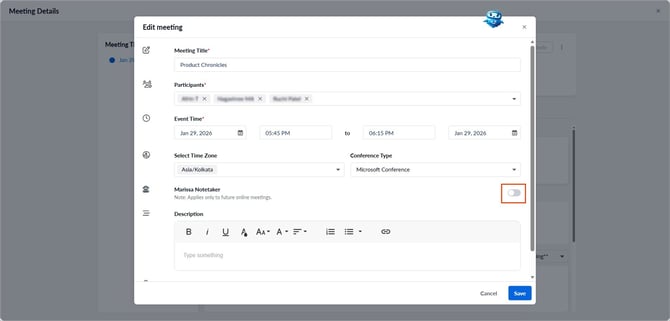
 Menu and select Edit Meeting.
 - Use the toggle to enable Marissa Notetaker.
Meeting insights from the agent
After the meeting ends, the agent provides meeting insights for the organizer and participants.
Navigate to Apps > Meetings > My Meetings.
- Select a meeting to open the “Meeting Details” page.
- View the meeting insights on the right side of the page.
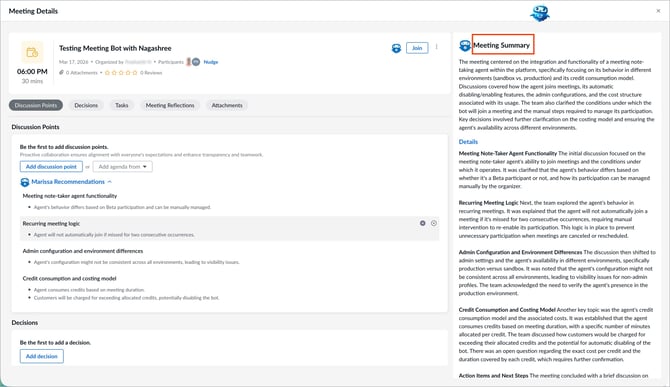
The agent also recommends discussion points and tasks based on the meeting conversation. You can add, edit, or delete these recommendations if required.