![Engagedly dark.png]](https://help.engagedly.com/hs-fs/hubfs/Engagedly%20dark.png?height=31&name=Engagedly%20dark.png)
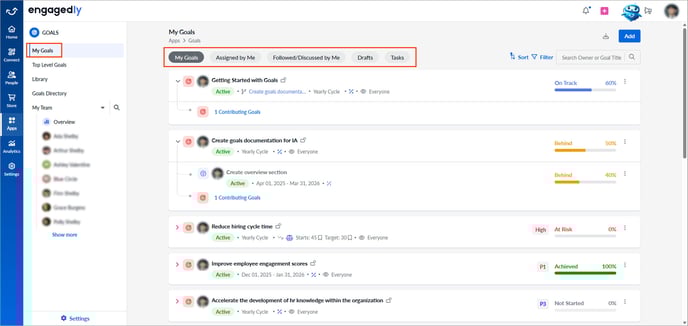
The "My Goals" dashboard is your landing page in the goals module. It gives you access to all your goals and allows you to manage them. You can track progress, review goals assigned to them, or stay updated on ongoing discussions. This page offers an organized view to help you stay focused and aligned with your objectives.
Navigate to Apps > Goals.
The "My Goals" page includes the following tabs:
My Goals: Goals that you own.
Assigned by Me: Goals you have assigned to others, regardless of who created them.
Followed/Discussed by Me: Goals you follow or collaborate on to stay informed and engaged in discussions.
Drafts: Unpublished goals you have created and saved. These may be under review or awaiting your manager’s approval.
Tasks: Provides quick visibility into your goal-related tasks for faster action and better tracking.
You can search, sort, or filter your goals as required to quickly find and organize the information you are looking for.
You can perform all actions on draft goals, just as you do on published goals, including editing, aligning, copying, assigning, cascading, adding key results or subgoals, and managing weights. Learn more in Manage a goal.