![Engagedly dark.png]](https://help.engagedly.com/hs-fs/hubfs/Engagedly%20dark.png?height=31&name=Engagedly%20dark.png)
Goal creators, assigners, and owners can initiate discussions within a goal and tag other employees to involve them in the conversation.
By default:
- Admins can participate in discussions related to all goals.
- Managers can participate in discussions about the goals of their direct reports.
Initiating a discussion helps clarify expectations, align efforts, and encourage collaboration. It ensures everyone is aligned and increases engagement toward achieving the goal.
Participants who are involved in discussions can add comments or feedback directly within a goal. This helps goal owners receive timely and clear input on expectations, progress, and areas for improvement. Comments remain attached to specific goals, making feedback easily accessible and reducing miscommunication.
This feature promotes
- Accountability enables goal owners to act on suggestions promptly.
- Collaboration involves relevant stakeholders in the discussion.
- Transparency and efficiency keep communication centralized and goal-focused.
Navigate to Apps > Goals.
Perform the following actions based on your role and the goal for which you prefer to initiate a discussion:
|
Role |
Navigation |
|
Goal owner (Individual goal) |
My Goals > My Goals tab. |
|
Goal assigner (Individual goal) |
My Goals > Assigned by Me tab. |
|
Admin (Top-level goal) |
Go to Top Level Goals. |
|
Admin (Individual goal) |
Select My Org > Select an employee. |
|
Manager (Direct report’s goal) |
Select a team > Select an employee. |
Add a comment
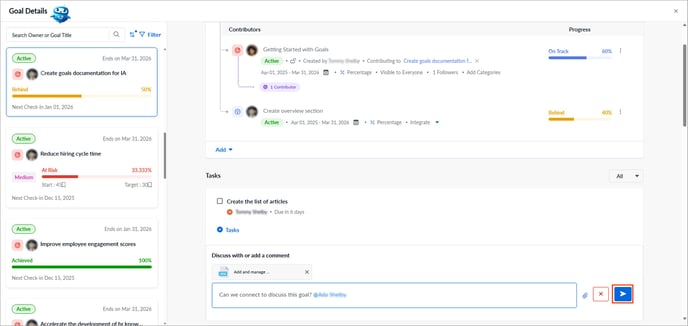
- Click a goal to open the "Goal Details" page.
The goal cards appear on the left, and the selected goal details appear on the right. - Scroll down to the “Discussion” field.
- Enter your comment.
- Enter @ followed by the employee’s name to tag someone.
- (Optional) Upload attachments to the discussion.
- Click the Send
.png?width=20&height=20&name=send%20(1).png) icon.
icon.
Manage a comment
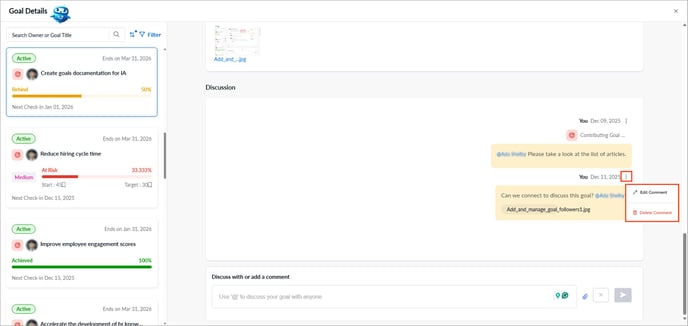
After adding your comment, click the Overflow  Menu next to it and select Edit Comment or Delete Comment as required.
⚠️Warning: Tagged employees can view the goal details, even if the goal visibility is restricted.