![Engagedly dark.png]](https://help.engagedly.com/hs-fs/hubfs/Engagedly%20dark.png?height=31&name=Engagedly%20dark.png)
Table of contents
1. Introduction
Gmail is an email application within the Google workspace. It allows users to manage emails, schedule meetings, organize tasks, and keep track of contacts, making it essential for both personal and professional communication and planning.
Integrating Gmail with Engagedly allows employees to interact with Accelerated Mobile Pages (AMP) within the Gmail interface. This integration enables employees to engage with interactive elements and dynamic content embedded in their emails, enhancing their experience by allowing them to perform actions without leaving Gmail.
2. Integration
If your organization uses Gmail as an email application and purchases the Engagedly application, employees will automatically start receiving notifications in Gmail without needing any integration.
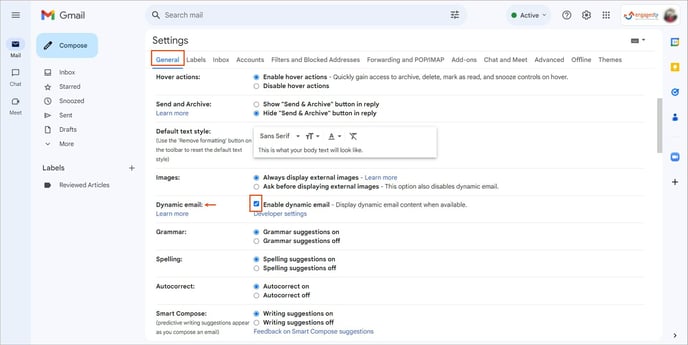
Note: By default, the option Dynamic email is enabled in Gmail, allowing employees to receive email notifications from Engagedly for specific events.
You can disable it if you do not want to receive email notifications.
Login to your Gmail account.
- Click Settings
 Icon at the top right.
 - In the General tab, deselect Enable dynamic email in the Dynamic email field.
3. After integration
After integrating with Engagedly, employees receive Gmail notifications for specific events in the Engagedly modules and can perform the following actions within Gmail.
|
Engagedly |
Gmail (AMP) |
||
|
Module |
Event/Action |
Dynamic notification (perform action) |
Static notification |
|
Social |
When others share
|
|
The post owner receives a notification if anyone:
|
|
Goal |
|
|
|
|
Team Pulse |
|
|
|
|
Feedback |
|
|
|
|
Meetings |
|
|
|
Gmail and Engagedly integration enhances employee engagement and productivity by streamlining workflows and minimizing the need to switch between applications.