![Engagedly dark.png]](https://help.engagedly.com/hs-fs/hubfs/Engagedly%20dark.png?height=31&name=Engagedly%20dark.png)
While creating the performance cycle, HR/admins can enable the manager’s review visibility to the employees or allow managers to enable it.
You can enable your review visibility for employees in multiple ways.
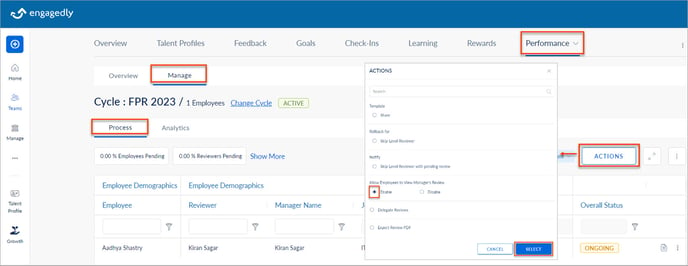
Navigate to Performance > Manage.
- In the Process tab, click ACTIONS.
- Select Enable to allow employees to view the manager’s review, and click SELECT.
Or
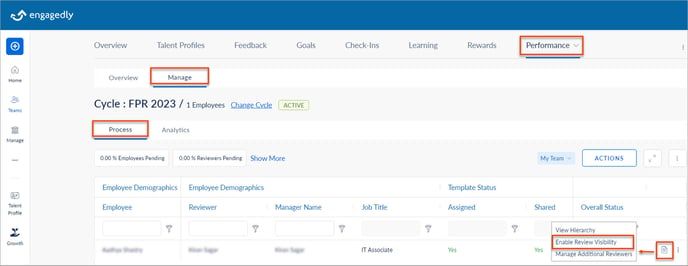
- In the Process tab, click the Overflow
 Menu for any employee and select Enable Review Visibility.
Or
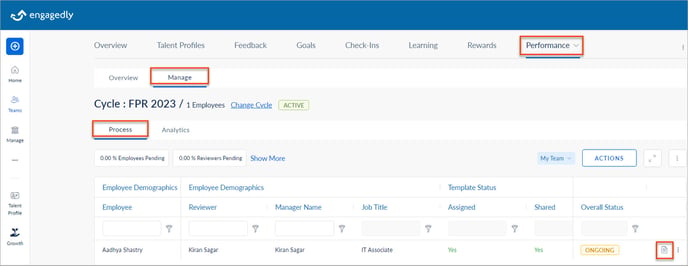
- In the Process tab, click the View Form
 Icon for an employee.
2. On the review form, click Change and click YES.
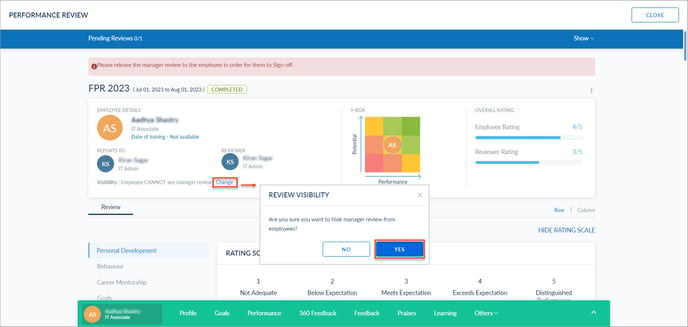
The sign-off process initiates after enabling the manager’s review visibility to the employees if all the participants have completed their reviews.