![Engagedly dark.png]](https://help.engagedly.com/hs-fs/hubfs/Engagedly%20dark.png?height=31&name=Engagedly%20dark.png)
After sharing the engagement survey, authors can nudge respondents if they have not submitted their responses.
Navigate to Surveys > Engagement.
- Click the Filter
Icon in the ALL ENGAGEMENT SURVEYS field.
- Click the drop-down and select Authored by You.
- Select an engagement survey where you want to nudge respondents.
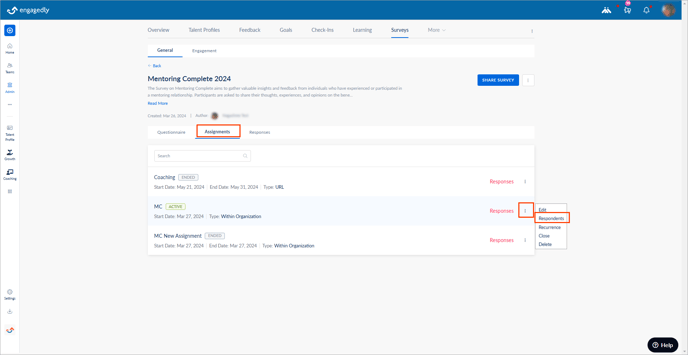
- In the Assignments tab, click the Overflow
 Menu on an assignment where you want to manage respondents and select Respondents.
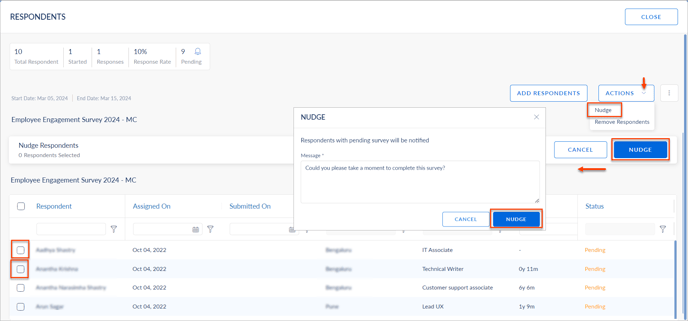
5. Click the ACTIONS drop-down and select Nudge.
6. Select the respondents manually or in bulk, and click NUDGE.
7. Edit the nudge message if required, and click NUDGE.
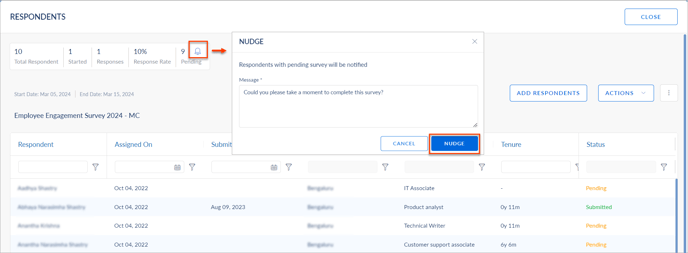
- Click the Bell
 Icon to nudge the respondents in bulk.
 - Edit the nudge message if required, and click NUDGE.
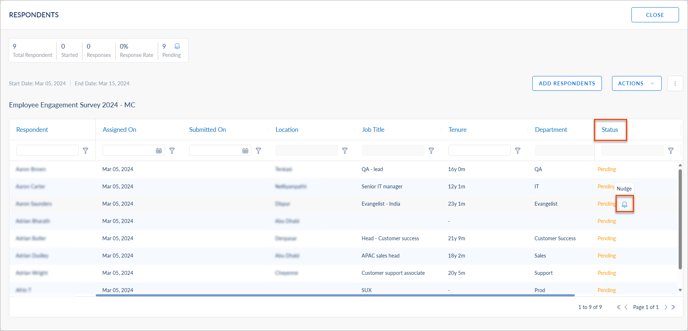
- Click the Bell Icon in the Status field to nudge the individual respondents.
- Edit the nudge message if required, and click NUDGE.
You can view and expot engagement survey reports of the respondents.