![Engagedly dark.png]](https://help.engagedly.com/hs-fs/hubfs/Engagedly%20dark.png?height=31&name=Engagedly%20dark.png)
After the manager’s submission, employees can view the ratings and comments provided by their manager on their performance (if HR/admins enable the manager’s review visibility for the employees). Learn more in Performance user guide for employees.
After the manager’s submission, you receive the notification to sign-off your review (if HR/admins enable the sign-off).
You can request a resolution if you have any concerns about your manager's ratings and comments.
You can access the review forms in multiple ways.
- On the home page, in the pending actions, click Start.
- Click the Bell
 Icon to view the in-app notification of the review.
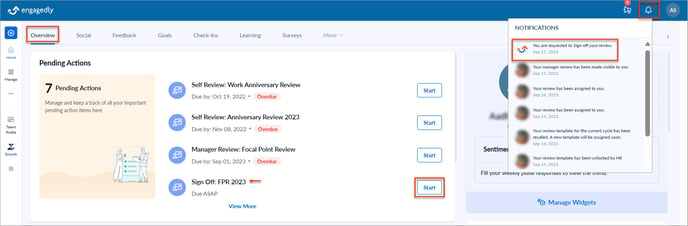
- Click View in your email notification.
Navigate to Performance > Overview.
- In the YOUR SUBMISSIONS field, click VIEW on the performance cycle where you want to open the review form.
- Click Sign Off on the left pane, which takes you to the sign-off section.
- Click REQUEST RESOLUTION, type the comment if required, and click SUBMIT.
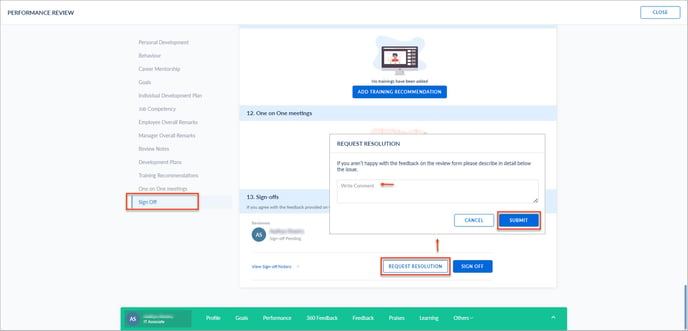
After you request a resolution, HR/admins receive a notification to rollback your manager’s review. Your manager then modifies their ratings and comments on your performance and resubmits their review. Then, you receive a sign-off notification. If you accept their ratings and comments, you can sign-off the review (if HR/admins enable the sign-off) to complete the process.