![Engagedly dark.png]](https://help.engagedly.com/hs-fs/hubfs/Engagedly%20dark.png?height=31&name=Engagedly%20dark.png)
Learners can start taking learnings assigned to them or those they are enrolled in.
Navigate to Learning > Home.
In the My Learning tab, you can view the active learnings assigned to you or if you have enrolled in them.
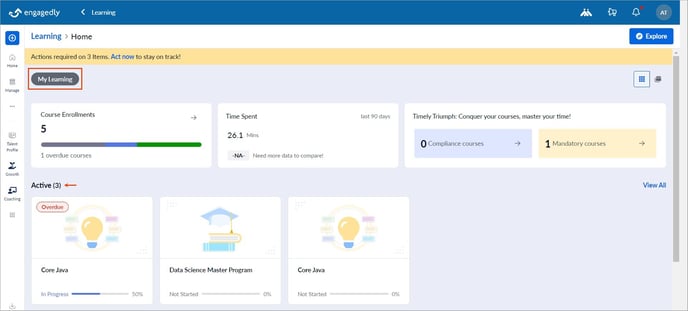
In the Active field, select a learning and click Start.
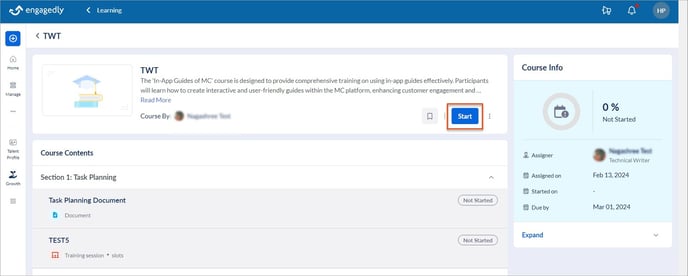
You can view the learning information, including the description, contents, duration, author, and co-author.
Scroll down to view the detailed information about the learning.
You can take learnings at intervals as required.
If authors add a quiz unit to a course and allow learners to retake failed quizzes, you can request a reset for the failed quiz.
Click Request Attempt at the top of the failed quiz.
If authors include both quiz and survey units in a course and link quiz results and the survey to course completion, you must complete and submit your responses.
Note:
- If the authors do not link the survey to course completion, you can skip it and mark it as complete.
- You cannot edit your responses after submitting the survey, but you can view them in the survey unit within the course.
- You cannot respond to the survey if you skip it and mark it as complete.
Once you complete each unit, you have to mark it as complete.
Note: You cannot mark the units as completed if the author enables manual evaluation.
If the author enables review, you can review the course after you complete it.