![Engagedly dark.png]](https://help.engagedly.com/hs-fs/hubfs/Engagedly%20dark.png?height=31&name=Engagedly%20dark.png)
Learners can view the learning schedule on their calendars.
Note: If the author has set the due date for learning, you can view them on your calendar.
|
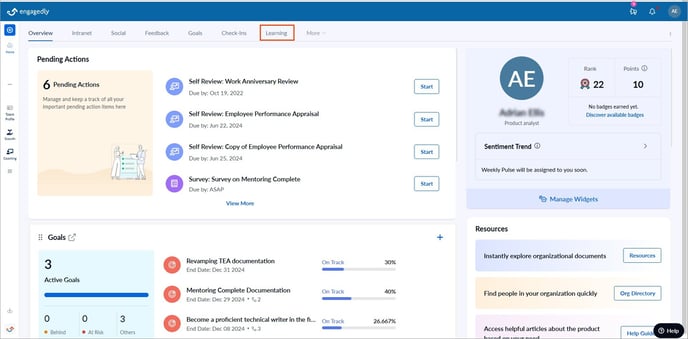
For Engagedly V1, navigate to Learning from the top.
|
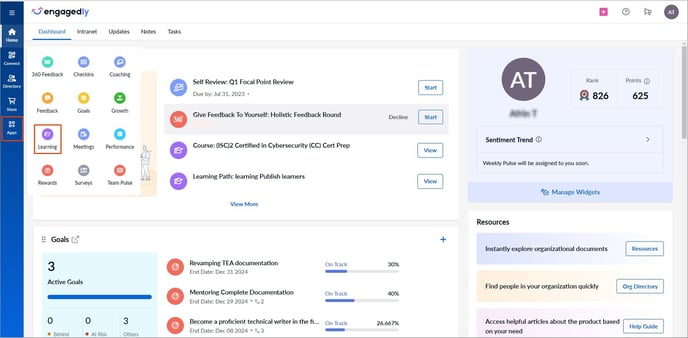
For Engagedly V2, navigate to Apps on the left pane and select Learning.
|
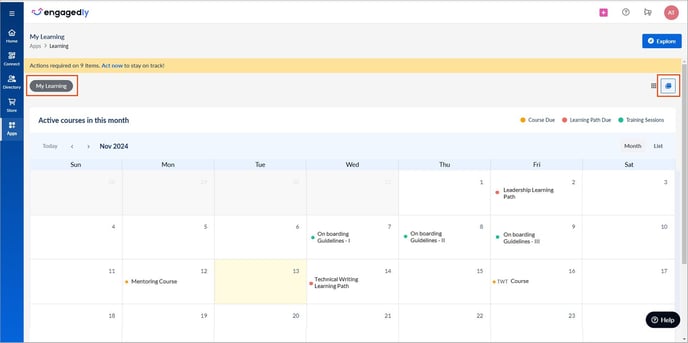
In the My Learning tab, click the Calendar  Icon at the top right.
View the due dates of the
- Course and learning path if the author has set the due date.
- Instructor training if you are registered.
Note:
You cannot view courses on your calendar if they do not have a due date.- You cannot view courses on your calendar if they do not have a due date.
- If the author adds you to a training session, you can register for it.
The calendar remains empty if:
- No courses are assigned.
- The assigned courses do not have a due date.
- You have registered for the instructor training.