![Engagedly dark.png]](https://help.engagedly.com/hs-fs/hubfs/Engagedly%20dark.png?height=31&name=Engagedly%20dark.png)
After admins launch a growth program, employees receive an email and in-app notifications to submit their growth profile.
Completing your growth profile helps you personalize your development journey from day zero. By sharing your skills, interests, motivators, and career goals, you enable your managers and admins to support your growth with the growth opportunities and learning resources.
Submit the profile
If you click Start My Growth Profile, you are redirected to your growth profile, which contains key sections of the growth hub.
- Open the email from the “Engagedly Team” with the subject “Your Growth Journey Starts Today”.
- In the email, click Start My Growth Profile to open the growth profile.
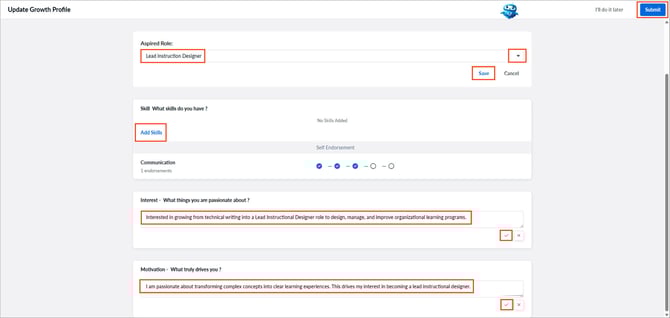
- Open the drop-down, select your aspired role, and click Save.
- Add skills or update the proficiency levels (if already added).
- Enter your interest and motivation, and click the Tick
 icon to save it.
 - Click Submit at the top right.
After submission, you are redirected to “My Growth Hub” (if you logged in to the Engagedly app), where your completed growth profile appears automatically.
Submit later
After opening your growth profile, if you prefer to submit it later, click I’ll do it later at the top right.
💡Tip: Submitting your growth profile helps admins personalize your development plans.
If admins have set automatic reminders, you continue to receive reminder emails until you submit the profile.
You can also view a “Complete My Growth Profile” reminder on the homepage and within the Growth module.
Update your growth profile at any time. Learn more in Submit your aspired role.