![Engagedly dark.png]](https://help.engagedly.com/hs-fs/hubfs/Engagedly%20dark.png?height=31&name=Engagedly%20dark.png)
While managing an active cycle, admins can track progress through the different status columns: “Employee Status”, “Reviewer Status”, and “Overall Status”.
To view different statuses
Navigate to Apps > Performance > Cycles.
- Locate the cycle you want to track.
- Click Manage on the right side of the cycle.
- In the “Process” tab, scroll to the right.
- View “Employee” and “Reviewer” status columns.
- View the “Overall Status” column at the extreme right.
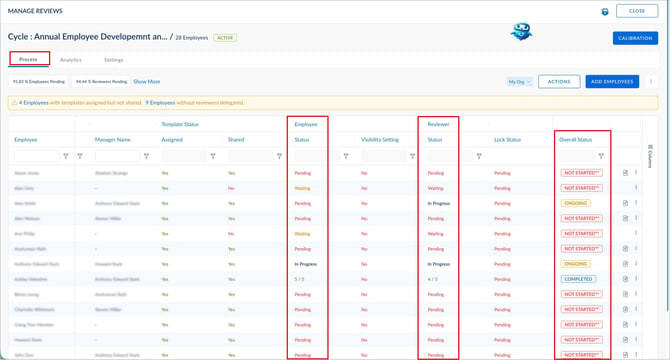
Employee's self-review statuses
These statuses reflect the employee’s progress and completion stage in the review cycle.
- Waiting: The review template is assigned to the employee but not yet shared, so the employee cannot start their self-review. This status also applies when the template is shared, but the employee has not started the self-review yet.
- Pending: The template is shared with the employee, but they have not opened or started filling the self-review.
- In Progress: The employee has started the self-review but has not yet submitted it.
- Completed: The employee has submitted their self-review. The actual rating is visible only if the viewer has permission to access the employee’s report. Otherwise, only the completed status is displayed.
📒Note: Admins can view ratings only for employees whose reports are accessible to them based on the configured visibility restrictions and hierarchy permissions. If an employee’s report falls outside the admin’s visibility scope, the admin can view only the “Completed” status and cannot access the actual ratings. For more information, refer to Visibility restrictions on the performance review forms and ratings.
Reviewer's review statuses
These statuses reflect the reviewer’s (typically the manager) progress and completion stage in the review cycle.
- Waiting: The reviewer cannot begin yet, because the template is not shared or a prerequisite step (such as the employee's submission, when sequencing is enabled) is still pending. This status also applies when the template is shared, but the reviewer has not started the self-review yet.
- Pending: The reviewer can access the review but has not started it.
- In Progress: The reviewer has opened and partially completed the review but has not yet submitted it. A fractional value (for example, 4/5) indicates the review is submitted and the reviewer rating is 4 out of 5.
- Completed: The reviewer has submitted their review, and the ratings provided for the employee.
Overall status
The overall status summarizes the cycle progress for each employee across all roles (employee, reviewer, and any additional roles such as skip-level reviewer and additional reviewer).
- Not Started: No participant has started their review, and they may not have opened the review form yet. This status can also indicate that participants are added to the cycle, but the review template is not yet shared with them.
- Ongoing: At least one participant has started the review. They opened the review form and either saved it manually or auto-saved it.
- Completed: All required participants have submitted their review, and signed off (if sign-off is enabled). The review status is completed after the admin submits their review.
- Locked: The admin has locked the review, preventing participants from making further edits. If an employee’s review is locked before the employee submits it, the employee-specific status changes from “Pending” to “Waiting” for all participants, indicating that no further action is expected from the employee. However, the overall review status remains “Locked”.