![Engagedly dark.png]](https://help.engagedly.com/hs-fs/hubfs/Engagedly%20dark.png?height=31&name=Engagedly%20dark.png)
Growth analytics helps admins and managers track employee skill development, competency alignment, and career progression. These insights help identify trends in workforce development, assess training effectiveness, and ensure employees are developing in alignment with organizational goals.
Admins can access analytics for the entire organization, allowing them to make data-driven decisions about workforce development.
Managers can access insights specific to their team, enabling them to support individual growth and improve team performance.
Navigate to Apps > Growth.
For admins: Open the drop-down > My Org.
For managers: Open the drop-down > Select a team.
-
On the left pane, click Overview to track key metrics.
-
Click the Download
 icon in each section to export data.
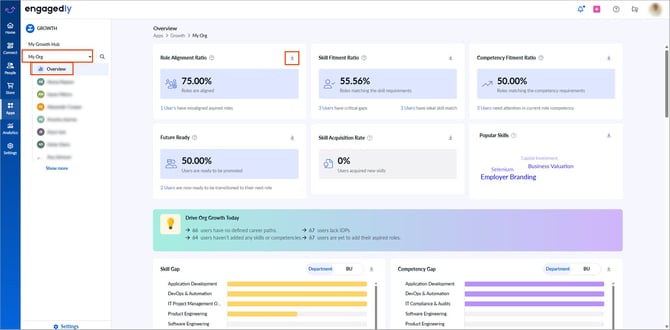
- Role alignment: Shows the percentage of employees whose aspired roles align with their current career path. Employees without aspired roles are marked as not aligned.
- Click the employee count to view whose aspired roles are not aligned.
- Skill fitment ratio: Identifies employees’ skills that align with the requirements of their current role.
- Nudge them to improve their skills.
- Competency fitment ratio: Highlights employees' competencies that align with the requirements of their current role.
- Nudge them to enhance their competencies.
- Future-ready: Lists employees who are prepared for their next role.
- Click the employee count to view who is ready for their next role.
- Skill acquisition rate: Tracks employees who acquired new skills in the last 90 days.
- Click the employee count to view who recently acquired new skills.
- Popular skills: Displays trending skills employees have acquired in the last 90 days.
- Drive teams growth today: Displays the number of employees who:
-
- Do not have defined career paths
- Lack IDPs
- Have not added any skills or competencies
- Have not submitted their aspired roles
-
Click the employee count in the respective field and then click Nudge to remind them to create IDPs, add skills and competencies, and submit aspired roles.
- Skill gap: Analyzes the difference between an employee’s current skills and the required skill level for their role.
- Hover over a business unit or department to view the percentage of employees with skill gaps.
- Select the business unit or department and hover over it to view the percentage of employees with skill gaps.
- Nudge them to bridge the gap and enhance their skills.
- Competency gap: Identifies the difference between an employee’s current competencies and role requirements.
- Hover over a business unit or department to see competency gaps.
- Select the business unit or department and hover over a business unit or department to view the percentage of employees with competency gaps.
- Nudge them to bridge the gap and enhance their competencies.
- AI-based insights: Categorizes employees’ motivations and interests into five topics and represents them as percentages.
- Skills and competencies linked to IDPs: Displays the most frequently linked skills and competencies in IDPs.
- Created v/s completed IDPs: Compares the number of IDPs created and completed in the last 180 days.
- Skill distribution: Displays skill distribution by business unit or department.
- Hover over a cell to view the number of employees with a specific skill.
- Click a cell to view employees and their proficiency levels.
- Nudge them to add or upgrade their proficiency levels.
📒Notes:
- Admins can view analytics by business unit or department.
- Managers can view skill distribution for their team, categorized into different columns. Hover over a cell to view the proficiency level of a specific skill.