![Engagedly dark.png]](https://help.engagedly.com/hs-fs/hubfs/Engagedly%20dark.png?height=31&name=Engagedly%20dark.png)
After creating IDPs, employees can add them to meetings to review development with their managers.
Admins and managers can add IDPs to meetings to facilitate discussions and support employee growth.
Adding IDPs to meetings ensures career development is regularly reviewed, encourages accountability, and aligns employee goals with organizational objectives.
Prerequisites
You must have an active subscription to Engagedly’s Meetings module to create a meeting or add an IDP to it.
📒Note: You cannot create meetings without integrating with Google or Microsoft Calendar. Contact our support team for calendar integration.
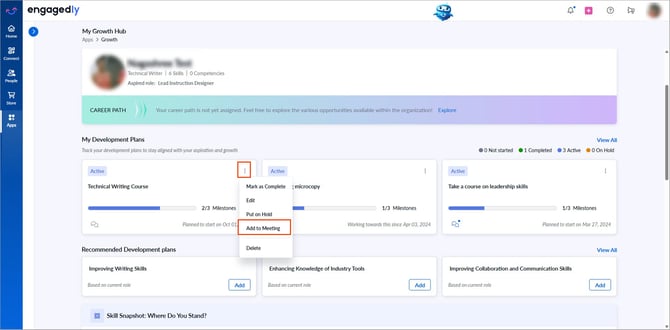
Navigate to Apps > Growth > My Growth Hub.
For admins: Open the drop-down, select My Org, and then select an employee.
For managers: Open the drop-down, select a team, and then select an employee.
- Click the Overflow
 Menu on an IDP and select Add to Meeting.
You can add an IDP to existing meetings to review development with your manager or create a new meeting.
Add an IDP to the existing meeting
-
Open the drop‑down to select participants.
Your name is added by default as the meeting organizer and cannot remove it.
-
Click the Calendar
.png?width=20&height=20&name=calendar%20(2).png) icon and select start and end dates to search for meetings.
icon and select start and end dates to search for meetings. -
Hover over a meeting, click Select, then click Add.
Create a meeting
-
Click Create Meeting.
- Follow the steps in Create and import meeting.
📒Note: Complete navigation and steps before referring to the Create and import meeting document.